A fridge went out of range overnight: ask your AI what happened
The opener walks in at 6 am and the walk-in feels warm. Maybe there was an alert on someone's phone at 3 am, maybe not. Before anyone decides what to do with what's inside, they need answers. How warm did it get? For how long? Is it back in range now, or still climbing? Is it the only unit?
If your fridges and freezers have thermometers connected to Mays, those answers already exist. You don't have to scroll a graph to find them. Ask.
Part of our series Run your restaurant with your AI: one real situation per post, with the words you type and what happens in Mays. The prompts and results are illustrative examples.
What the manager types
Maya L., the manager at Harbor Lane Café's Riverside location, gets the opener's text and writes from home:
"Did any fridge at Riverside go out of range overnight? How warm, how long, and is it OK now?"
What the AI does in Mays
It asks Mays for Riverside's temperature alerts. That's one read-only question, and the answer has three parts:
- Out of range right now: each thermometer whose latest reading is above its maximum or below its minimum, with the temperature, the limit it crossed and since when.
- Excursions in the last 24 hours: each time a unit went out of range and came back, with the peak temperature, how long it lasted, and when it started and ended. You can ask for a longer window, up to 7 days: "any excursions this week?".
- Not reporting: sensors that are offline or haven't sent a reading in more than 30 minutes, with their last reading. A silent sensor isn't a safe one.
Temperatures are in °F, and every time is on the location's own clock.
What you see
The AI answers in plain words, for example (illustrative):
"The Riverside walk-in went above its 41°F limit at 2:10 am, peaked at 46.8°F and came back in range at 3:05 am, so it was out for 55 minutes. It's at 37.2°F now. Nothing else is out of range. The bar milk fridge hasn't reported since 11:40 pm."
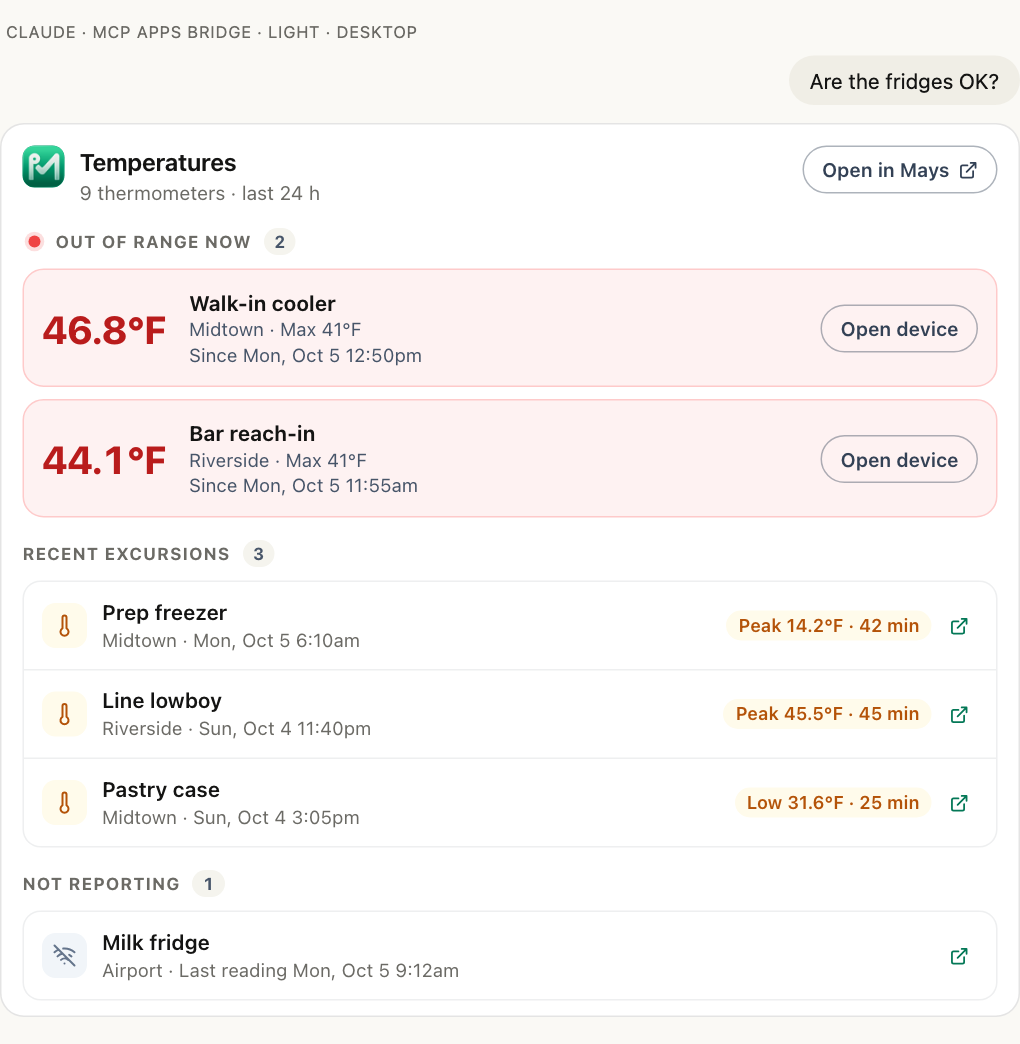
In ChatGPT and Claude, a Mays temperature card appears under the answer: what's out of range now in red at the top, recent excursions with peaks and durations below it, then sensors that stopped reporting. Open device takes you to that thermometer in Mays.
Then set the follow-up
What to do with the product is your decision, under your food safety plan and your health department's rules. Mays gives you the facts to decide with. Once you've decided, the follow-up for the team is one more message, and with actions allowed it's created after you see a preview and say yes:
"Create a task for whoever opens at Riverside today: check the walk-in door gasket and send a photo, high priority."
The AI creates a one-off task at Riverside, due today, answered with a photo. It shows up in the team's task list, and whoever is on shift is notified because it's due today and not assigned to one person. You can also assign it to one person by name.
Mays also does its own part without being asked. When a unit stays out of range past the alert delay you set, Mays creates a task at that location and notifies whoever is on shift (see Temperature thresholds and alerts). The AI chat is for the questions that come after.
What it replaces
Before | With Mays connected to your AI |
|---|---|
Open the thermometer app, find the unit, scroll the graph back to 2 am | Ask, and get the peak and duration |
Screenshot the graph and text it to the owner | The owner asks the same question |
Write the follow-up on the whiteboard | The task is in the team's app, with a photo answer |
Wonder whether the quiet sensor is fine | Sensors not reporting are listed |
What it needs
- Connected thermometers. Mays reads the thermometers connected to it (see Setting up Govee thermometers) with the safe range you set for each.
- Access to thermometers in Mays, at that location.
- For the task: permission to manage tasks, the organization's Allow AI apps to take actions setting, and make changes ticked when you connected.
What Mays doesn't do here
- It doesn't tell you whether food is safe. It reports temperatures and times. The decision, and the corrective action, follow your food safety plan.
- It doesn't read thermometers that aren't connected. A unit without a sensor isn't in the answer. Hand-written logs stay hand-written, unless you move them to a checklist with a number answer.
- It doesn't change the alert settings from the chat. Ranges and alert delays are set on the thermometer in Mays.
For an inspector or your records, export the temperature log from Mays: Health-department temperature logs.
Try it on your next alert
- Connect Mays to ChatGPT, Claude or Grok from mays.app/ai (ChatGPT, Claude, Grok). Connect Mays to ChatGPT, Claude or Grok explains what it can read.
- Ask "Are the fridges OK?" any time, not only after an alarm.
- Turn what you find into a task for the next shift.
Try Mays free for 30 days, with no credit card, and connect it to the AI you already use.