Setting up payroll for the first time: a checklist for a Florida restaurant or café
Your first hire is a milestone, and it comes with paperwork that has deadlines. Some accounts have to exist before the first paycheck, some forms are due on the employee's first day, and a few filings come every quarter whether you had a good one or not.
This is the last post in our series on running the numbers in your first year. It walks through the setup in order, federal first and then Florida, with a link to the official page for every rule. Most new owners hand the calculations and filings to a payroll provider; this checklist helps you know what they should be doing and what stays on your desk.
This is general information, not legal or tax advice. Checked October 4, 2026, on the pages linked below. Rules and rates change, so confirm with the agency, your payroll provider or an accountant before you rely on a figure.
Before the first hire
1. Get an EIN
An Employer Identification Number is the business's tax ID; you'll need it for every payroll account below. The IRS issues it online, free: "If it's approved, we'll issue your EIN immediately online," and "You never have to pay a fee for an EIN." The application has to be finished in one session (IRS, Get an employer identification number).
2. Decide who runs payroll
The SBA's steps for hiring your first employee include choosing "an in-house or external service for administering payroll" and deciding "who will manage your payroll system" (SBA, Hire and manage employees). A payroll provider calculates withholding, files the returns and makes deposits for you, but the responsibility stays with the employer, so know the deadlines below either way.
3. Register for Florida reemployment tax
Florida's version of state unemployment tax is the reemployment tax, run by the Florida Department of Revenue. You're liable once you have "At least one quarterly payroll totaling $1,500 or more," or "One or more employees for a day (or portion of a day) during any 20 weeks in a calendar year" (Florida DOR, Reemployment tax). From the same page:
- Register with the online Florida Business Tax Application by the end of the month after the quarter in which you became an employer.
- The initial rate for a new employer is 2.7%.
- The tax applies to "the first $7,000 of wages paid to each employee by their employer in a calendar year."
- File the quarterly report (Form RT-6) by the end of the month after each quarter, "even if you had no employees or wages to report for that quarter."
4. No state income tax withholding
"Florida does not impose a personal income tax" (Florida DOR FAQ), so there's no state income tax to withhold from paychecks. Federal income tax, Social Security and Medicare still apply.
5. Get workers' compensation insurance if it applies
Outside construction, Florida says "Employers with four (4) or more employees, including business owners who are corporate officers or Limited Liability Company (LLC) members, must have workers' compensation coverage" (Florida Division of Workers' Compensation, coverage requirements). Ask your insurance agent about it before you reach that number, not after.
6. Put up the required posters
Every employer covered by the FLSA's minimum wage rules "must post, and keep posted, a notice explaining the Act in a conspicuous place" (DOL, FLSA minimum wage poster). The Department of Labor's poster advisor shows which federal posters apply to you. Florida adds its own: an employer who must pay the Florida minimum wage "shall prominently display a poster" about it in each establishment (s. 448.109, Florida Statutes), and if you employ minors, a child labor poster (Florida DBPR, child labor FAQs).
On each new hire's first days
7. Form W-4
The IRS tells employers: "Ask each new employee to complete the 2026 Form W-4" (IRS Publication 15). It sets their federal income tax withholding. Keep it with your records for at least 4 years; you don't send it to the IRS (same publication).
8. Form I-9
"All employers must complete and retain Form I-9" for every person they hire (USCIS, I-9 Central):
- The employee completes Section 1 "no later than their first day of employment" (USCIS, Section 1).
- You complete Section 2, after looking at their documents, "within 3 business days of the date of hire." If they start on Monday, that's by Thursday (USCIS, Section 2).
- Keep it for "three years after the date of hire, or one year after the date employment ends, whichever is later" (USCIS, M-274 retention).
9. E-Verify: Florida's rule for 25 or more employees
Florida requires larger private employers to check new hires in E-Verify: "Beginning on July 1, 2023, a private employer with 25 or more employees shall use the E-Verify system." The employer "must retain a copy of the documentation provided and any official verification generated, if applicable, for at least 3 years," and repeated failures can lead to fines of $1,000 a day (s. 448.095, Florida Statutes). Read the statute for the details, including how employees are counted.
Below 25 employees, the state rule doesn't require it, but you can enroll voluntarily (E-Verify, the enrollment process). E-Verify doesn't replace the I-9; you still complete one for everyone.
10. Report the new hire to Florida within 20 days
Every new employee goes to Florida's New Hire Reporting Center: "Employees should be submitted within 20 days of the date of hire." The report needs your federal EIN, business name and address, and the employee's name, address, Social Security number and date of hire. Independent contractors paid $600 or more a year are reported too (Florida DOR, new hire reporting instructions; Florida DOR, services for employers). The SBA describes the same 20-day rule nationally (SBA).
11. Set the right wage
Florida's minimum wage reached $15.00 an hour on September 30, 2026 (Florida Constitution amendment, full text), and the tip credit is $3.02 (DOL, state tipped minimum wages). Tipped staff, overtime and the worked examples are in our Florida restaurant pay rules guide. Minors have extra limits on hours and work, and Florida's child labor FAQs start from "A minor must be 14 years old to work" (Florida DBPR, above).
Choosing a pay frequency
Florida doesn't set one: the Department of Labor's table of state payday rules lists Florida under "No regulations or not specified" (DOL, State payday requirements). You choose, and the SBA's list includes scheduling pay periods "to coordinate tax withholding for IRS" (SBA).
Frequency | Paychecks a year | Good to know |
|---|---|---|
Weekly | 52 | Matches the overtime workweek exactly; more payroll runs |
Every two weeks | 26 | Two full workweeks per check; a common choice |
Twice a month (e.g. 1st and 16th) | 24 | Same dates each month, but a workweek can fall across two periods |
Monthly | 12 | Fewest runs, a long wait between checks for hourly staff |
Whatever you pick, overtime is counted by the workweek, not by the pay period. If you pay twice a month, check weekly overtime by hand when a workweek is split between two periods. Our post on time clock, breaks and overtime covers the overtime math.
Tips
If your staff earn tips:
- Employees report cash tips to you in writing, unless they get less than $20 in tips from you in a calendar month, "by the 10th day of the month after the month the tips are received" (IRS, Tip recordkeeping and reporting).
- Form 8027 is for large food or beverage establishments: generally, one that "normally employed more than 10 employees on a typical business day during the preceding calendar year," where tipping is customary (same page).
- A credit for tax on tips: "Certain food and beverage establishments use this form to claim a credit for social security and Medicare taxes paid or incurred by the employer on certain employees' tips" (IRS, Form 8846). Ask your accountant whether you qualify.
Tip pools and what managers may keep are covered in tip pooling for new restaurant owners.
The deadlines that repeat
What | When | Source |
|---|---|---|
Federal tax deposits (withheld income tax, Social Security and Medicare) | A new employer usually starts on the monthly schedule: by the 15th of the next month, by electronic funds transfer | IRS Topic 757; IRS, Employment tax due dates; IRS, Depositing and reporting |
Form 941, quarterly federal return | April 30, July 31, October 31 and January 31 | |
Florida RT-6, quarterly reemployment tax report | End of the month after each quarter, even with no wages | |
Form 940, annual federal unemployment tax (FUTA) | January 31; FUTA is 6.0% on each employee's first $7,000, with a credit of up to 5.4% for state unemployment tax | |
Forms W-2 | To employees and the Social Security Administration by January 31 |
IRS due dates are adjusted when they fall on a weekend or a legal holiday (IRS Publication 15); your payroll provider's calendar will show the exact dates.
Keep the records
- Employment tax records: "for at least 4 years after the date that the tax becomes due or is paid, whichever is later" (IRS, How long should I keep records).
- Payroll records under the FLSA: at least three years, and time cards and schedules for two (DOL Fact Sheet #21).
- I-9s and E-Verify records: the periods above.
Your first-payroll checklist
- EIN from the IRS
- A payroll provider chosen, or a written plan to run it yourself
- Florida reemployment tax account (Florida Business Tax Application)
- Workers' compensation coverage, if you'll have four or more employees
- Federal and Florida posters up
- A W-4 and an I-9 from every new hire, Section 2 within 3 business days
- E-Verify for every new hire, if you have 25 or more employees
- Each new hire reported to Florida within 20 days
- Wages at or above Florida's minimum, tip credit set up correctly
- A pay frequency and a workweek that line up
- A calendar with deposit and filing dates
Where Mays fits
Mays isn't a payroll provider: it doesn't withhold taxes, file returns, make deposits, or collect W-4s and I-9s. What it does is get clean hours and tips to the provider you choose, from the same app your team clocks in with:
- Pay periods (Scheduling → Settings → Pay periods): an admin picks the Pay frequency (Weekly, Every two weeks, Twice a month (1st & 16th) or Monthly) and the date the first period starts, whose weekday is your payroll week. Set it up before the first payroll run.
- Wages: set an hourly wage on each person or position, or a weekly salary. Salaried staff come through the export with their hours; your provider pays the salary.
- Timesheets (Scheduling → Time Clock): review every punch in the period, fix missing punch-outs, approve, and close the period so hours can't change after you export.
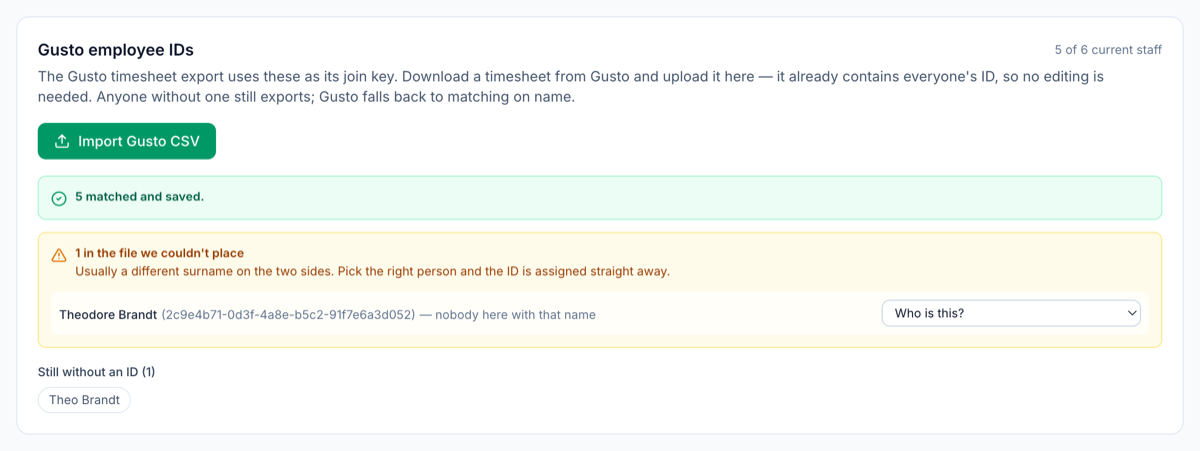
- Payroll export: a Standard CSV with regular, overtime and double-time hours and wages, tips and gross pay for any provider, or a Gusto timesheet file to import into Gusto, matched by each person's Gusto employee ID. To load those IDs once, download a timesheet from Gusto and upload it under Scheduling → Settings → Gusto employee IDs (the image at the top of this post); anyone it can't match by name is listed for you to assign. (Mays doesn't send hours to Gusto directly yet.)
- Tips: with a tip pool on, each person's share goes into the export.
Start payroll on clean hours
Set your pay period once, and each payroll starts from approved timesheets instead of a spreadsheet.
Start your free trial: 30 days, every module, no card needed. Back to the start of the series: prime cost for a new restaurant.