Moving from Craftable? Connect your Craftable store with an API token, and Mays brings in your items, vendors and prices, and Craftable's own usage history if you want it.
Who: admins, on the web. Managers can open Inventory → Import, but it says This page is available to org admins only.
Before you start, get these from Craftable:
- your Craftable store id and Director brand id;
- an API token for the store.
What comes over
From Craftable | In Mays |
|---|---|
Items (active ones) | Items with their category, subcategory, barcode, count unit and Craftable's cost. Items Craftable shares across your stores are shared with all your locations; the rest belong to the target location. |
Vendors (active ones) | Vendors, by name only, with the order method manual. |
Prices | Each vendor's pack, SKU and price for an item, taken from your most recent Craftable invoices. |
Usage (optional) | Craftable's own daily usage, for your reports. See below. |
An API token doesn't give Mays your recipes, modifiers, menu lists, par levels or extra units such as case: Craftable doesn't share them that way. Build them in Mays (see Recipes and plate costing), or ask Mays support if you'd like help bringing them over.
Connect and import
- Go to Inventory → Import.
- Under Craftable connection, enter the Craftable store id and Director brand id.
- Pick the Target location: the Mays location this Craftable store is.
- Click Save connection.
- Paste the token under Connect with an API token and click Connect token. Mays checks it with Craftable first. The badge turns connected and the token box says in use.
- Under Import, click Import now. A large store can take a minute or two.
- Check the result. Import complete shows how many Vendors, Items, Vendor prices and Recipes were Created, Updated or Skipped (inactive), and any warnings.
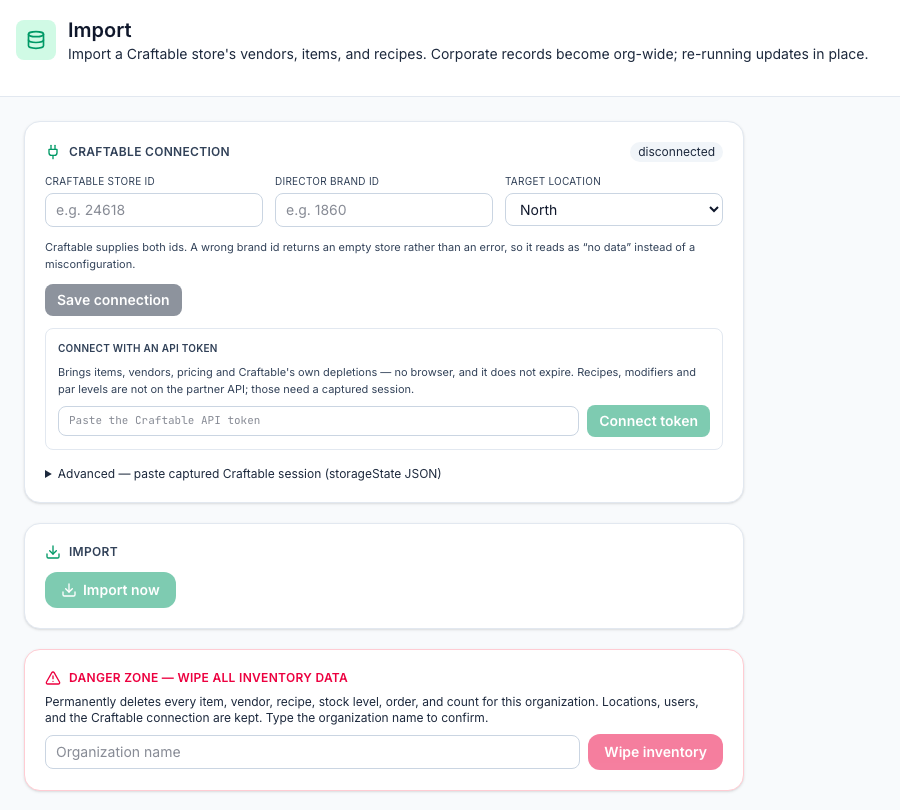
Warnings you'll see: with a token there's always a note that recipes, modifiers, par levels and unit conversions aren't available. That's expected. A wrong brand id doesn't give an error: Craftable returns an empty store, so the import brings in nothing. If you get all zeros, check both ids.
Importing again updates what's already there instead of making copies.
Advanced — paste captured Craftable session is for the Mays team. You don't need it for a token import.
Bring in Craftable's usage (optional)
Without recipes, Mays can't work out from your sales what you used, so COGS and prime cost have nothing to go on. Import depletions (theoretical usage) brings in the usage Craftable already worked out, day by day. The section appears once you're connected with a token.
- Run the item import first. Usage for an item that isn't in Mays is skipped.
- Pick the From and To dates. The last 30 days are filled in.
- Click Import depletions. You see how many lines came in across how many days, and how many were skipped.
Importing the same dates again replaces them. Usage Craftable recorded from your POS counts in Inventory → Reports (see Inventory reports) and in Prime cost; adjustments someone made by hand in Craftable don't.
It's refused at a location that has any POS mappings, because Mays already works out usage there from your recipes and would count it twice.
Remove the connection or start over
- Remove connection forgets the store ids and the token: Remove the Craftable connection? Imported items, vendors and recipes are kept.
- Danger zone — wipe all inventory data permanently deletes everything in Inventory for your whole organization, at every location: items, vendors, recipes, stock levels, orders, invoices and counts. Locations, users and the Craftable connection are kept, so you can import again straight away. Type your organization name exactly and click Wipe inventory. It can't be undone.
Good to know
- Prices come in for the target location only. Shared items are shared, but their Craftable prices are set for the target location, so other locations don't see them on their order form. Add prices for other locations on each item. See Inventory items.
- Set up vendors after your last import. Importing again with a token clears each vendor's contact details, order emails, address, account number and payment terms, sets its order method back to manual, and clears its minimum at the target location. Delivery days are kept. See Vendors and vendor catalogs.
- Importing again also overwrites imported items: their names, categories, units, barcodes and cost come from Craftable again.
- Imported costs win. Recipes use an imported item's Craftable cost instead of its vendor prices.