See every call to a location's AI phone receptionist, read what each caller asked and heard, and block numbers that keep calling. Mays also blocks robocallers on its own.
Who: admins, and managers for their own locations, on the web. Where: the location's IVR (AI Receptionist) tab, under Calls & blocked. You need the AI phone receptionist add-on for the location.
The call log
- Go to Locations & Users → Locations and open the location.
- On the IVR (AI Receptionist) tab, open Calls & blocked.
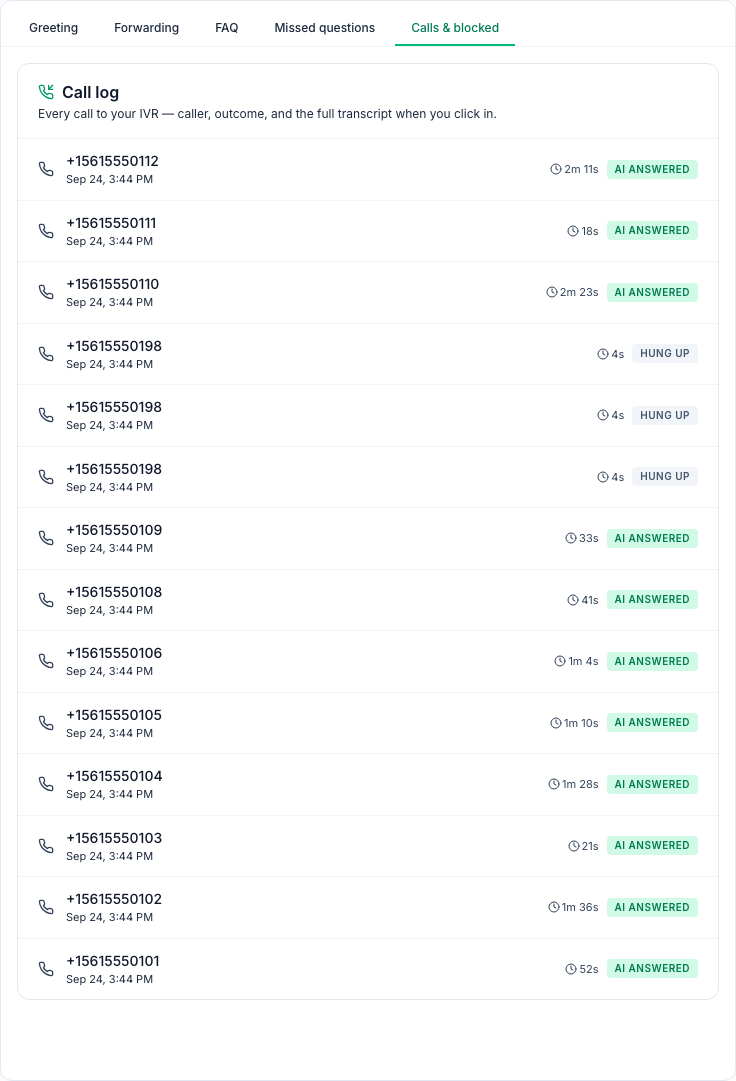
The newest calls are at the top, 20 to a page, with the caller's number, the time, how long the call lasted and what happened:
Badge | What it means |
|---|---|
AI answered | The caller got through to the receptionist. Calls that were put through to your fallback phone show this badge too. Open the call: its transcript says Put through to the store and why. |
SMS sent | The caller pressed 1 and was texted your address. |
Hung up | A call under 15 seconds where the caller did nothing, usually a robocaller. |
Spam | A blocked number called and was hung up on straight away. |
Limit hit | The day's call limit was reached, so the caller was turned away. |
Failed | Someone called while the location's subscription wasn't active. |
Read a call
Click a call to open its Call transcript:
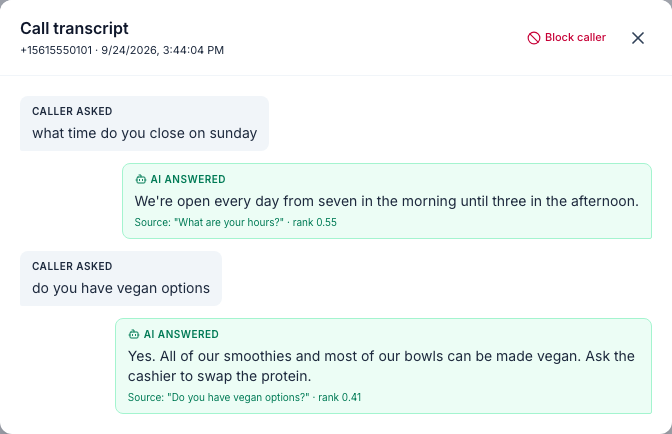
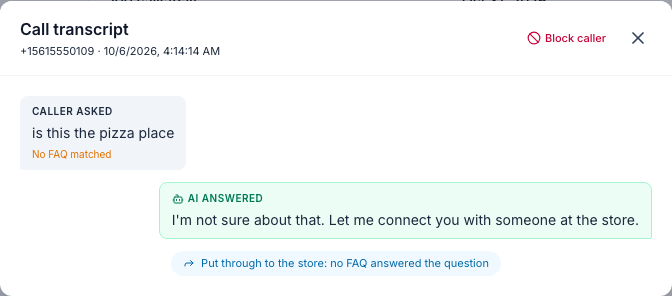
- Caller asked: what the caller said, as text. No FAQ matched means no answer was found.
- AI answered: what the receptionist said. Source shows the FAQ it read out.
- Caller pressed 1 or 9: the key the caller pressed.
- Put through to the store: the receptionist put the caller through to your fallback phone, and why: the caller pressed 9, or no FAQ answered the question.
- Recording: click Play recording to listen, when the location has call recording.
- What the caller and your staff said after the call was put through isn't written down. With call recording, you can listen to it.
Block a caller
- Open one of their calls.
- Click Block caller, then OK to confirm.
- From then on, the receptionist hangs up on that number straight away, without saying anything. The call is logged as Spam and doesn't count toward the daily limit.
- A block you add applies to this location and lasts a year.
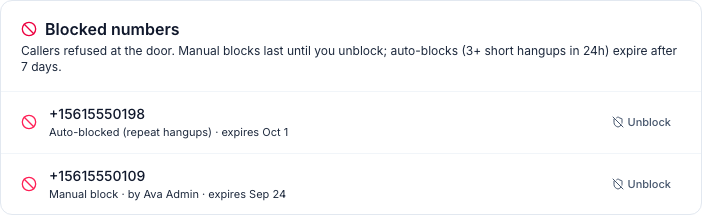
Blocked numbers appears under the call log once there's at least one block. It shows who added each block and when it ends. To let a number call again, click Unblock and confirm.
How Mays keeps robocallers out
- Press any key. When the phone network can't confirm a caller's number, or the number is hidden, the caller first hears Welcome to (your business and location). Press any key to continue. A person presses a key and hears your greeting. If nobody presses a key within 4 seconds, the call ends and is logged as Hung up. A caller who got through this way doesn't hear it again at that location for 7 days.
- Automatic blocks. Every hour, Mays blocks any number with 3 or more Hung up calls to your locations in the last 24 hours. The block covers all your locations and lasts 7 days (Auto-blocked (repeat hangups)). Mays never blocks this way:
- the phone number of an active team member in Mays;
- someone who talked to the receptionist in that time.
- After you unblock an automatically blocked number, Mays doesn't block it again for 24 hours.
Good to know
- The blocked list's end dates have no year. A block you added today shows today's date, but it ends a year from now.
- The tab shows the latest 100 calls. Older calls are kept, but you can't page back to them.
- Numbers only. The log shows the caller's number in full, not a name.
- Only people who can open the location's IVR tab see the log: admins and the location's managers.
- If a payment fails, the Calls & blocked tab is hidden until the payment goes through.
- Robocallers don't use up your calls. Hung up, Spam, Limit hit and Failed calls don't count toward the daily limit.