The first 90 days of a new café: a week-by-week operations playbook
The build-out is done, the espresso machine is plumbed in and the sign is up. Now comes the part no contractor hands over: running the place, every day, the same way, with a team that met each other last week.
This playbook covers the first 90 days of operations for a small café. It's written for first-time owners and operators who haven't picked their systems yet. Each stage starts with what to do, then says where Mays fits. You can follow the whole plan with paper and a group text if you want to. It just takes more of your evenings.
The scenario
The example throughout is a café that opens 7 am to 4 pm, seven days a week, with eight people:
People | Role | Typical shifts |
|---|---|---|
You | Owner / operator | Wherever you're needed |
1 | Shift lead (manager on duty) | Opens or closes, five days |
4 | Baristas | Mix of opening, mid and closing shifts |
2 | Counter / prep (part-time) | Weekday rushes and weekends |
Swap in your own numbers. The sequence holds for a bakery counter, a juice bar or a small quick-service kitchen.
Weeks 1–2: build the foundation
Hire for roles, then write the roles down
Before the first shift, decide what each role owns. Who opens? Who can count the drawer? Who is allowed to throw out product? Who can approve a shift swap? New teams don't break down because people are lazy. They break down because two people each thought the other one was doing it.
Put it in writing: a one-page description per role, and a list of which roles can do what in your systems. In Mays, every team member has a role (admin, manager or employee, or a custom role you build from permissions) and one or more locations, so a barista sees their own shifts and tasks while the shift lead can also approve swaps and review checklists.
Opening and closing checklists — with proof for the things that matter
Your opening and closing checklists are your standards. A good one is short enough to finish on a busy morning and specific enough that two different people do it the same way. Group the tasks the way the shift actually moves:
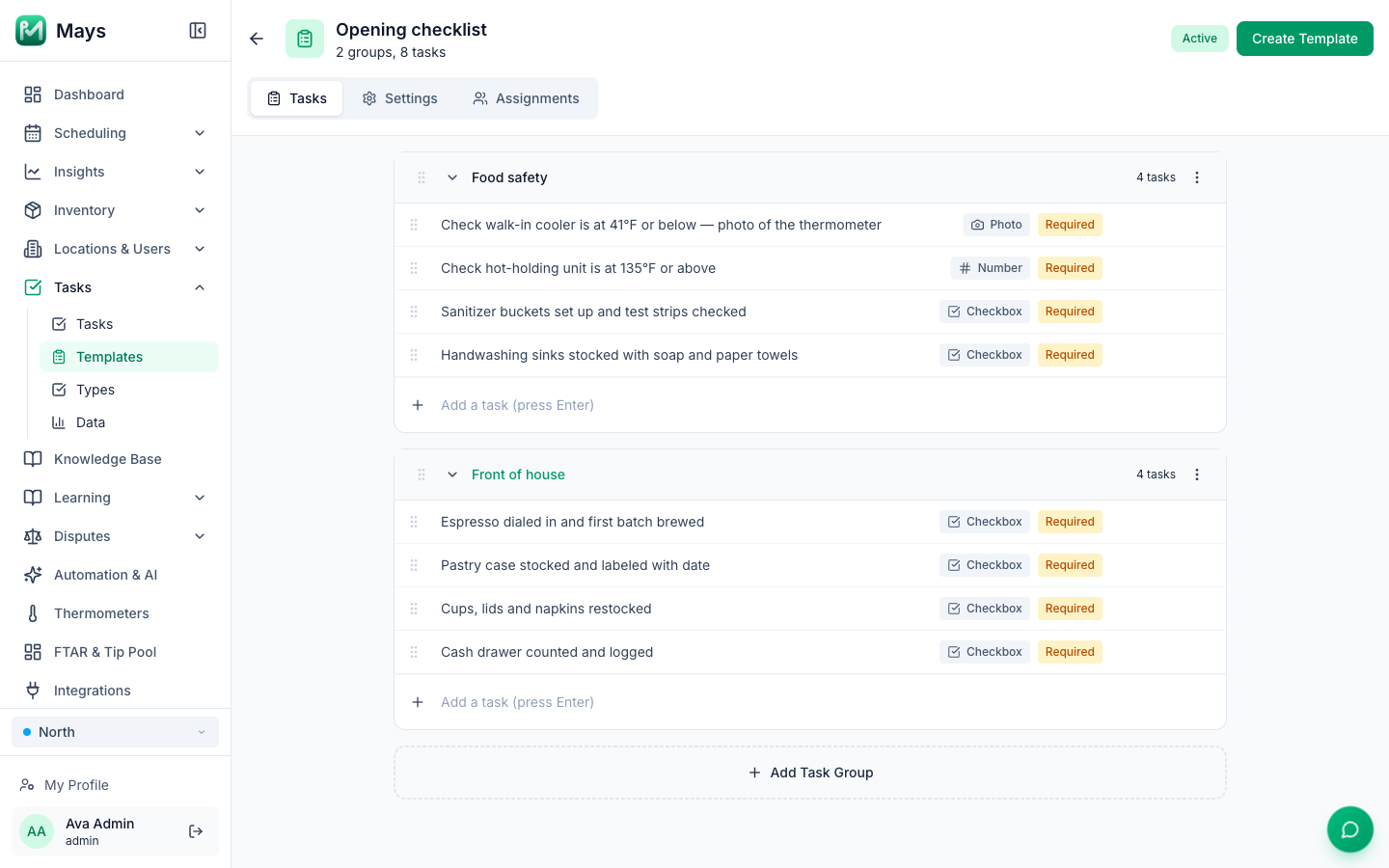
- Food safety: cooler and freezer temperatures, hot-holding temperatures, sanitizer set up and tested, handwashing sinks stocked.
- Front of house: espresso dialed in, pastry case stocked and date-labeled, cups and lids restocked, drawer counted.
- Close: equipment cleaned, product wrapped and labeled, trash out, doors and alarm.
Not every task needs evidence, but a few do. A photo of the cooler thermometer or the sanitized counter settles "did anyone check?" in five seconds.
In Mays, a checklist template has groups and tasks, and each task has an answer type: checkbox, photo, number, text, multiple choice, GPS, inventory count or a custom form. You schedule the template daily, weekly or monthly, and assign it by location, role or person. When a task needs a photo, AI photo verification can check the picture against the standard you described and flag or reject one that doesn't match, so the shift lead reviews exceptions instead of every photo. The image at the top of this post shows an opening checklist being built in Mays.
Food-safety logs from day one
Temperature logs are the habit that's hardest to start late. The FDA Food Code, which state and local inspectors base their rules on, says time/temperature-controlled foods must be held at 135°F or above when hot and 41°F or below when cold (FDA Food Code 2022, §3-501.16; the current FDA Food Code page lists every edition). Your local rules decide how often you log. Decide your own cadence (at opening, mid-day and closing is a common pattern) and make it a checklist task, not a clipboard that lives by the door.
Florida notes. Florida's restaurant rules are enforced by the Division of Hotels and Restaurants, which adopts the FDA Food Code (the 2017 edition) by reference (Rule 61C-1.001, F.A.C.). Two staffing rules land in your first two months:
- Food handler training: food service employees must receive certification within 60 days after employment (s. 509.049, Florida Statutes).
- Certified food protection manager: managers have 30 days after employment to pass the required test (s. 509.039). Every licensed establishment needs at least one certified food protection manager responsible for all periods of operation, and when four or more employees are engaged in storing, preparing or serving food at one time, one must be present (Rule 61C-4.023).
Put both deadlines on your calendar the day each person starts.
Where Mays fits: temperature checks go into the opening and closing checklists as number or photo answers. If you install smart thermometers (Mays works with Govee sensors, bought separately), Mays records the readings, alerts you when a unit leaves the range you set, can open a task for the shift, and exports the temperature log as a CSV or PDF for an inspection.
Weeks 3–6: find your rhythm
A schedule rhythm the team can count on
By week three you know roughly when the rushes are. Now make the schedule predictable:
- Publish on the same day every week, at least a week ahead.
- Collect availability in writing (not in a text thread) and set a deadline for time-off requests.
- Decide the swap rule once: for example, a trade is fine if the coworker accepts and a manager approves.
In Mays, you build the week on a grid, and shifts stay drafts until you publish. Publishing notifies the team, who see their shifts in the iOS and Android apps. Availability, time off, open shifts and trades come in through the same app and land in one approvals inbox. Overtime warnings show up while you're building the week, before anyone works the hours. The schedule post in this series goes step by step: How to build your first restaurant staff schedule.
Time clock and breaks
Clock-ins are where schedule meets payroll. Pick one way to clock in and stick to it: staff clock in on their own phones, on a shared tablet kiosk with a PIN, or by tapping an NFC tag at the counter. Mays does all three, shows break reminders on the phone, and lets managers review, fix and approve timesheets before exporting them to payroll (a standard CSV or a Gusto-format CSV).
On breaks: federal law does not require lunch or coffee breaks, but when you offer short breaks (usually about 5 to 20 minutes) they count as paid work time, while real meal periods of at least 30 minutes don't (US Department of Labor). States can add their own rules, so check yours. Florida's apply to minors, and the schedule post covers them.
First inventory counts
Don't try to count everything in week three. Pick the 20–30 items that cost the most or run out most often (milk, beans, cups, the pastry order) and count them weekly, on the same day, at the same time. Two or three counts in, you'll see your real usage and can set a par for each: the amount you want on hand before the next delivery.
In Mays, counts run on a phone, and the same item list feeds purchase orders to your vendors, a waste log and, later, recipe costing.
Start replying to reviews
Your first reviews arrive within weeks, and early replies set the tone. Answer every review, thank people by name when you can, and treat a low rating as a to-do, not a debate. Mays connects to your Google Business Profile: once each location is linked to its Google listing, you filter unanswered and low-rated reviews and reply without leaving the app.
Weeks 7–12: tighten the numbers and the training
Labor as a percentage of sales
Once you have six or eight weeks of sales, compare what you schedule against what you sell. Labor % is simply labor cost divided by sales for the same period. There's no universal "right" number for a café. Set a target from your own budget, then check each week's schedule against it before you publish.
Mays shows scheduled hours and labor cost as you build the week, lets you set a weekly budget, and calculates labor % against sales once your POS is connected (Square today). The Forecast page projects sales from your POS history, so you can staff to it.
Prep lists and pars
The inventory counts from week three now pay off. Turn your pars into a daily prep list: how many of each item to have ready before open, adjusted for the day of the week. Prep sheets in Mays are par-based, so the list tells the opener what to make instead of relying on memory.
Training that doesn't live in your head
By week ten, you've answered the same questions a dozen times. How do we steam oat milk? What goes in the closing sanitizer? Where's the breaker for the grinder? Write those answers down once, in a knowledge base, with photos or a short video. Then turn the essentials into training for new hires.
In Mays, the knowledge base holds your recipes, SOPs and documents, and staff can search it (or ask the built-in AI, which answers from your own articles). Training modules are built from those articles, with a quiz and a passing score, and assigned by role, location or person, so every new barista gets the same path.
Your 90-day checklist
Weeks | Do this | In Mays |
|---|---|---|
1–2 | Write roles and permissions | Roles and locations per team member |
1–2 | Opening and closing checklists with photo proof | Checklist templates, AI photo verification |
1–2 | Temperature logs; Florida training deadlines on the calendar | Number/photo tasks, thermometer alerts and log export |
3–6 | Publish the schedule on a fixed day; one swap rule | Schedule, availability, time off, approvals inbox |
3–6 | One way to clock in; review timesheets weekly | Phone, kiosk or NFC clock-in; timesheet approval and payroll CSV |
3–6 | Weekly counts of your top items; set pars | Mobile counts, vendors and purchase orders |
3–6 | Reply to every review | Google reviews inbox |
7–12 | Labor % against your own target | Scheduled labor, weekly budget, labor % with Square |
7–12 | Daily prep list from pars | Prep sheets |
7–12 | Write down SOPs; train new hires by role | Knowledge base, training modules and quizzes |
One app instead of a stack
Everything above can be done with separate tools: a scheduling app, a checklist app, a temperature system, a training platform, a review tool, a group chat and a spreadsheet for counts. Many cafés start that way. Each new app is another login for your team and another place to check when something slips. We added up what that stack costs in How many apps does a new restaurant really need?
Mays puts the whole list in one app: one login for the team, one place for the manager to look, and one flat fee per location with unlimited team members. Pure Green, a juice-bar chain in South Florida, runs its stores' daily opening and closing checklists in Mays.
Start your first 90 days in Mays
Set up your roles, your opening checklist and your first schedule in an afternoon. Then run the rest of this playbook from your phone.
Start your free trial: 30 days, every module, no card needed. Or book a walkthrough and we'll set it up with you.