Find people who were added twice, by email, phone or name, and merge the extra accounts into the one you keep. Check what moves first, because it can't be fully undone.
Who: admins, on the web. For a custom role, the permission is Create / edit users in every location + assign roles. See Roles and permissions.
Find duplicates
- Go to Locations & Users → Users.
- Click Find duplicates. On a narrower window it's under Actions.
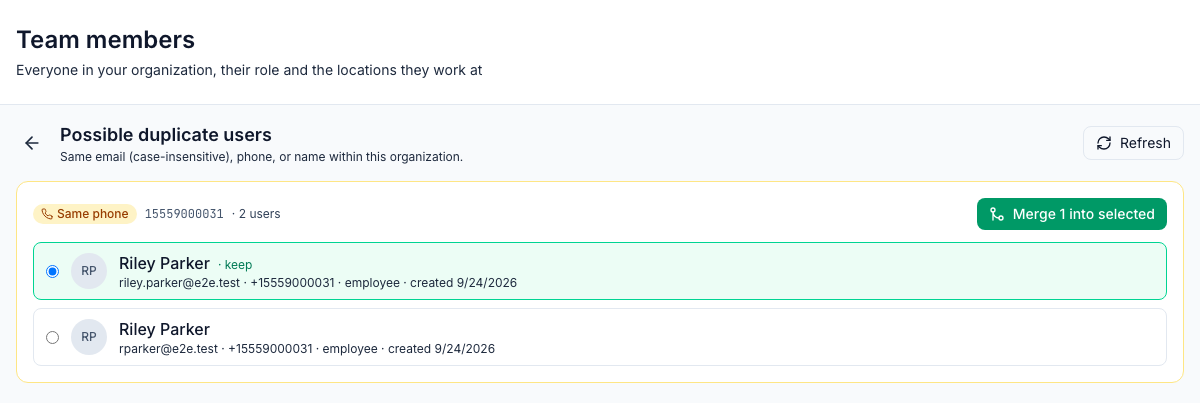
- Possible duplicate users lists each group of people who look like the same person, and why:
- Same email, ignoring capital letters;
- Same phone, ignoring spaces, dashes and brackets;
- Same name, first and last. Check these carefully: two different people can share a name.
Each person shows their email, phone, role and the day they were added. Inactive people are included; deleted accounts aren't. Click Refresh after making changes. With nothing to show, the page says No likely duplicates found.
Merge them
- In the group, pick the account to keep. The oldest one is picked to start with and marked · keep.
- Click Merge 1 into selected (or Merge 2… for a bigger group).
- Confirm Merge 1 duplicate user into Riley Parker?
The group disappears, and the other accounts are marked Deleted.
Keep the account the person signs in with. The kept account's email, phone, name, role and pay stay exactly as they are, and nothing is copied over from the others. A deleted account keeps its email address, so it can't be moved to the kept account afterwards.
What moves and what doesn't
Moves to the kept account | Stays with the deleted account |
|---|---|
Their locations | Shifts, including future ones |
Chat conversations, messages and reactions | Clock-ins and timesheets |
Tasks assigned to them, their answers, comments and likes | Time off, availability and time-off balances |
Their notifications | Positions and wages |
Their link to 7shifts and other connected systems | Training, quiz results, points and badges |
Checklists assigned to them by name |
The deleted accounts are signed out everywhere and stop getting notifications.
Before you merge: move the duplicate's future shifts to the kept account on the schedule, and give the kept account the right positions and pay. See Positions and wages.
Can it be undone?
Not fully. For 30 days you can restore a deleted account (Show deleted → ⋮ → Restore, see Deactivating team members and deleting accounts), but what moved stays with the kept account: the restored account comes back with no locations, chats or tasks. After 30 days the deleted account's contact and sign-in details are removed and it can't be restored; its shifts, clock-ins and pay stay.
Good to know
- Same email groups only appear when the addresses differ in capital letters, because each email address can only be used once.
- People brought in from 7shifts without an email aren't compared by email.
- Merging is on the web only.