Pest control log template: sightings, service visits and IPM for a small restaurant
A single mouse dropping behind the dry storage shelf is a fix-it-today problem. The same dropping, found by an inspector, with no record that anyone noticed, called anyone or did anything, is a violation and a bad morning. A pest control log is how you show that you look, that you act, and that a professional is involved.
This post covers the integrated pest management (IPM) approach the EPA describes, what the FDA Food Code expects, what to record, and how to work with a licensed pest control operator. It ends with a log you can copy.
This is general information, not legal or pest control advice. Pesticides are applied by a licensed professional, following the product label and your state's rules.
IPM in a restaurant: look first, spray last
The EPA describes integrated pest management as "an effective and environmentally sensitive approach to pest management that relies on a combination of common-sense practices." It's "not a single pest control method but, rather, a series of pest management evaluations, decisions and controls", built on four steps. Here's what they look like in a kitchen:
EPA step | In a restaurant |
|---|---|
Set action thresholds | Decide in advance what triggers a call: for most kitchens, any rodent sign or any live cockroach means calling your pest control company the same day. |
Monitor and identify pests | Glue boards or monitoring stations placed by your operator, checked on a schedule; every sighting written down with where and when. |
Prevention | Seal gaps, fix door sweeps and screens, keep food covered and off the floor, clean under equipment, empty trash, fix leaks. |
Control | Traps, baits in tamper-resistant stations and targeted treatments, applied by your licensed operator. The EPA's page says "Broadcast spraying of non-specific pesticides is a last resort." |
Most of the work is prevention, and most of prevention is cleaning and maintenance that's already on your cleaning schedule.
What the Food Code expects
Section numbers are from the 2022 FDA Food Code. The FDA has since published a 2026 edition; the rules quoted here haven't changed in substance in it.
- Keep pests out, and look for them. "The PREMISES shall be maintained free of insects, rodents, and other pests." That's done by "Routinely inspecting incoming shipments of FOOD and supplies", "Routinely inspecting the PREMISES for evidence of pests", using trapping devices or other methods if pests are found, and "Eliminating harborage conditions" (§6-501.111).
- Remove what you catch. "Dead or trapped birds, insects, rodents, and other pests shall be removed from control devices and the PREMISES at a frequency that prevents their accumulation, decomposition, or the attraction of pests" (§6-501.112).
- Close the openings. Outer openings are protected by "Filling or closing holes and other gaps along floors, walls, and ceilings", closed, tight-fitting windows, and "Solid, self-closing, tight-fitting doors" (§6-202.15(A)).
- Bug zappers go where they can't drop insects on food. They're installed so that "The devices are not located over a FOOD preparation area" (§6-202.13(B)(1)).
- Bait goes in a station. "Rodent bait shall be contained in a covered, tamper-resistant bait station" (§7-206.12).
- Pesticides follow the label, and the pros apply the strong ones. A pesticide is used according to the "manufacturer's label instructions that state that use is allowed in a FOOD ESTABLISHMENT", food and equipment are protected during application (removed or covered, then cleaned and sanitized afterwards), and "A restricted USE PESTICIDE shall be applied only by an applicator certified" under federal law, or someone under their direct supervision (§7-202.12).
- Your operator follows your rules in the kitchen. The person in charge ensures that people "such as delivery and maintenance PERSONS and pesticide applicators" entering food areas comply with the Food Code (§2-103.11(C)).
The EPA adds that restricted use pesticides "may be bought and applied only by a certified applicator or someone working under his or her direct supervision" and "are not available for purchase or use by the general public" (EPA, certification of pesticide applicators). Leave the treatments to your operator and keep store-bought sprays out of the kitchen.
Choosing a pest control company
The EPA's Citizen's Guide to Pest Control and Pesticide Safety is written for homes, but its questions work for a restaurant too:
- Is the company licensed? "Most state or local agencies issue state pest control licenses. Make sure the pest control operator's licence is current if one is required in your state." Ask for the license number and check it with your state pesticide agency.
- Will they inspect and explain the plan? The guide says any company "should inspect your premises and outline a recommended control program", including the pests to be controlled, the active ingredients and the non-chemical alternatives.
- What's their track record? Ask other restaurant owners, and ask your state pesticide agency about complaints.
- Are they insured? The guide says "you should think twice before hiring a company that is not insured."
- Do they guarantee their work? And what do they need from you to keep the guarantee (access, cleaning, repairs)?
For a restaurant, add two more: how often will they visit (monthly is common; ask what they recommend for your building), and will they leave a written service report every time, with what they found, what they applied, and what they need you to fix.
What to record
Every sighting (any employee)
Field | Example |
|---|---|
Date and time | Wed 6:20 am |
Where | Dry storage, behind the flour bins |
What | 3 mouse droppings |
Who found it | Opener |
What we did now | Area cleaned and sanitized; flour bins checked, lids tight; manager told |
Called the operator? | Yes, 7:00 am; visit booked for Thursday |
Every service visit (manager)
Field | Example |
|---|---|
Date, company, technician | Thu 2:00 pm, licensed operator, technician name and license number |
Areas inspected | Kitchen, dry storage, walk-in area, dish, outside dumpster pad |
Activity found | Droppings in dry storage; one live cockroach under the dish machine |
Treatments applied | Product, active ingredient and where, from the technician's report |
Devices checked or added | Bait stations outside checked; two monitors added in dry storage |
What they need us to fix | Door sweep on the back door; gap around the pipe under the three-compartment sink |
Report filed | Yes (copy kept with this log) |
Fixes they asked for
Fix | Who | By when | Done |
|---|---|---|---|
Replace back door sweep | Owner | Next Monday | |
Seal gap around pipe under the three-compartment sink | Maintenance | Friday |
A monthly pest walk
Between visits, walk these spots once a month with a flashlight (they're also on our monthly self-inspection):
- [ ] Under and behind equipment on the line and in dish
- [ ] Dry storage: corners, under the bottom shelf, inside bins
- [ ] Walk-in door gasket and around the condenser
- [ ] Doors: sweeps tight, no light under the back door, self-closers working
- [ ] Holes around pipes and conduit; cracks in walls and baseboards
- [ ] Drains and floor sinks clean
- [ ] Dumpster lids closed, area clean
- [ ] Incoming deliveries checked for pests (see our receiving log)
- [ ] Bait stations and monitors where the operator put them, undisturbed
Where Mays fits
Mays has no pest module, but the log above fits in its custom forms and checklists:
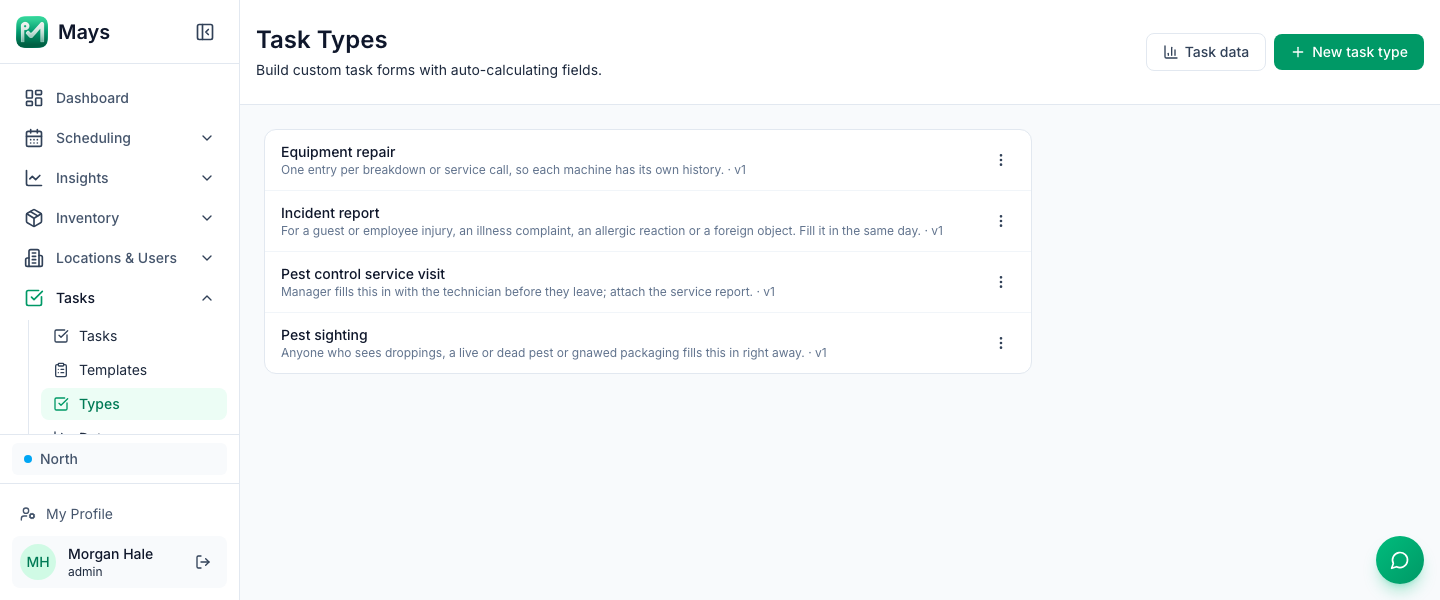
- Build two forms. Under Tasks → Types, an admin clicks New task type and builds Pest sighting (a Date / time, Single choice fields for where and what, a Photo, a Text box for what you did and a Yes / No for whether the company was called) and Pest control service visit (company, technician and license number, Multiple choice for the areas inspected, activity, treatments and fixes as Text, a Photo of the service report and a Signature). The image at the top of this post shows both in the Task Types list.
- Put each form in an on-demand template. Under Tasks → Templates, create a template with one task, set its answer type to Custom form and pick the form under Task Type in the task's Edit Task window, then set Frequency to Custom. Custom templates never run on a schedule.
- Start one when it's needed. When someone reports a sighting, or the technician arrives, the manager goes to Tasks → Create Task → From Template, picks the template and assigns it to themselves (or to whoever found it). The form is filled in in the iPhone or Android app.
- Walk the building monthly. Put the pest walk above on a Monthly checklist template, with Photo answers for the spots that matter.
Everything submitted is kept: Tasks → Data lists every sighting and visit with one column per field for the dates you pick, and Export CSV downloads it (photos and signatures stay on each submission and aren't in the CSV). Keep the company's PDF service reports and your contract in a Knowledge Base folder shared only with managers. The Logbook is the place for "found droppings in dry storage, operator coming Thursday" so the next manager on shift knows.
Two limits: choosing a form for a task needs access to Tasks → Types, which only admins have by default, and staff can't start a form on their own, so sightings go through the manager on shift.
Look first, call fast, write it down
Every sighting recorded, every visit filed, every fix with a name on it.
Start your free trial: 30 days, every module, no card needed. Or book a walkthrough and we'll build your pest log with you.