Instagram for a new café: what to post in the first 90 days
The espresso machine works, the sign is up, and someone says, "We should really be posting." So you post a photo of a latte, then nothing for nine days, then three posts in one afternoon. That's how most new cafés start on Instagram.
You don't need an agency or a content calendar app to do better. You need a properly set-up account, a short list of things worth showing, a weekly rhythm your team can keep, and a few rules you shouldn't break. This guide covers all of it, as a plan for your first 90 days.
This is the first post in our Marketing a new café series. The next ones cover short video, listings beyond Google, email and text lists, local partnerships, menu photos and the grand opening.
Instagram changes its features often. Every Instagram rule and limit below was checked against Instagram's Help Center on October 5, 2026, and is linked where it's used. This is general information, not legal advice.
Step 1: Set the account up as a business
Switch to a professional account. Instagram offers two kinds: business and creator. Its own guidance is that "Business accounts are best for retailers, local businesses, brands, organizations and service providers" (Instagram: set up a professional account). A professional account gives you insights, contact details and ads. One catch from the same page: "If your personal account is private, switching to a professional account will make it public."
Fill in the profile like a listing:
- Name and handle: the name on your sign, so people can find you by searching for it.
- Bio: what you are, where you are and your hours, in plain words. "Neighborhood coffee shop. Pastries baked here. Open 7–4 daily."
- Links: you can add up to 5 websites to your profile (Instagram: add links to your profile). Put your menu first.
- Contact details and an action button: add your address and phone when you switch. Action buttons such as Order now or Reserve are "being gradually introduced and may not be available to you yet", and only one can show at a time (Instagram: action buttons).
Tag your location on every post. When people tap the location, "they will be able to see your content and other content tagged at the same location on the Instagram map" (Instagram: add a location).
Step 2: Decide what's worth posting
A new café has more to show than it thinks. Pick four or five themes and rotate them:
Theme | What it looks like |
|---|---|
The craft | A latte being poured, the croissant tray coming out, a new drink being built step by step |
The people | The barista who knows every regular's order (with their permission), the baker at 5 a.m. |
The place | The room in morning light, the patio, the neighborhood around you |
What's new | Seasonal drinks, a returning favorite, a sold-out item that's back |
Practical info | Hours, holiday closures, parking, how to order ahead |
The practical posts matter more than they seem. A Story saying "Closed Monday for Labor Day" saves a regular a wasted trip.
Step 3: Use each format for what it's good at
- Feed posts (photos and carousels): the permanent record of your café. Someone deciding whether to visit scrolls your grid, so it should show your best drinks, food and room.
- Reels: short vertical video. Instagram lets you record and edit Reels up to 20 minutes, but "Reels over 3 minutes won't be recommended to new audiences" (Instagram: Reels). For a café, 10 to 30 seconds is plenty. The next post in this series covers shooting them on a phone.
- Stories: the daily, casual layer. Stories "disappear from Feed, your profile and Direct after 24 hours, unless you add it as a highlight" (Instagram: Stories).
- Highlights: Stories you pin to your profile. They "remain visible as highlights until you remove them" (Instagram: Highlights). Make three on day one: Menu, Hours, Find us.
Step 4: The 90-day plan
Days 1–30: open and introduce yourself
- Post the opening: the door, the first customers' drinks (not their faces unless they agree), the team.
- Introduce one team member a week, with their favorite drink.
- Show the menu in a carousel and pin it as a Highlight.
- Answer every comment and DM within a day.
- Aim for two or three feed posts or Reels a week, plus Stories on most days. Steady beats busy.
Days 31–60: find what works
- Try one Reel a week: a pour, a bake, a "how we make it".
- Post your first menu change or special, with the date it ends.
- Start reposting customers' posts and Stories that tag you, with their permission.
- Check your insights every two weeks (Step 7).
Days 61–90: settle into a rhythm
- Keep the posts that got saves, shares and profile visits, and drop the formats that didn't.
- Plan next month's posts in one sitting, then schedule them.
- Try one collaboration with a local business or creator (Step 6).
Step 5: Scheduling, hashtags and music
Scheduling. You can schedule posts in the Instagram app, "up to 25 posts a day, up to 30 days in advance". The same page notes that "product tagging, collaborative posts, sponsored posts and fundraisers aren't compatible with scheduled content at this time" (Instagram: schedule posts). Meta Business Suite also lets you "create and schedule posts to publish on Facebook and Instagram" (Meta: schedule posts).
Hashtags: five at most. Older advice says 30. Instagram's current rule: "You can use up to 5 tags on a post. If you include more than 5 tags on a single photo/video, your comment won't post" (Instagram: hashtags). Use your neighborhood, your city and what the post is about.
Music: use cleared sounds. Meta says that "certain business accounts and certain types of posts do not have access to the library" of licensed music. It points businesses to the Sound Collection, "over 14,000 songs and sounds which are entirely royalty free and safe to use in Reels and Instagram Stories" (Meta: music for businesses).
Step 6: Working with local creators, the FTC way
A free lunch for a local food creator is the most common café collaboration, and it comes with rules.
- Free food is a "material connection." The FTC says a material connection includes "giving you free or discounted products or services" (FTC: Disclosures 101 for social media influencers). In its Q&A about a new restaurant, the FTC says that "if you give free meals to people – whether relatives or strangers – and seek their endorsement, they should disclose this fact" (FTC: Endorsement Guides, what people are asking).
- You share the responsibility. Under the Endorsement Guides, "Advertisers are subject to liability ... for failing to disclose unexpected material connections between themselves and their endorsers" (16 CFR 255.1(d)). The FTC also says advertisers "need to have reasonable programs in place to train and monitor members of their network."
- Use the label and plain words. Instagram requires the paid partnership label for branded content, which "may include when products and services have been gifted for free" (Instagram: branded content). The FTC adds: "Don't assume that a platform's disclosure tool is good enough", and don't rely on vague tags like "collab."
Don't buy followers or likes. The FTC's rule on fake reviews and testimonials bans buying "fake indicators of social media influence" for a commercial purpose (16 CFR 465.8). The same rule bans paying for reviews that express a particular sentiment (465.4). Our guide to your first 50 Google reviews covers what that means for reviews.
Step 7: Read your insights once every two weeks
The professional dashboard shows "reach, engagement, and audience demographics" and a summary of the last 30 days (Instagram: professional dashboard). You can view insights for any timeframe "within the past 90 days", and follower trends appear once you have at least 100 followers (Instagram: insights).
Don't chase every number. For a café, ask three questions:
- Which posts got saved or shared? Make more like them.
- Which posts led to profile visits and link taps? That's people deciding to come.
- Which times and days does your audience show up? Post then.
Where Mays fits
Mays doesn't post to Instagram or schedule social posts. You do that in Instagram or Meta Business Suite. What Mays does is make sure the content gets shot, by the people who are actually in the café.
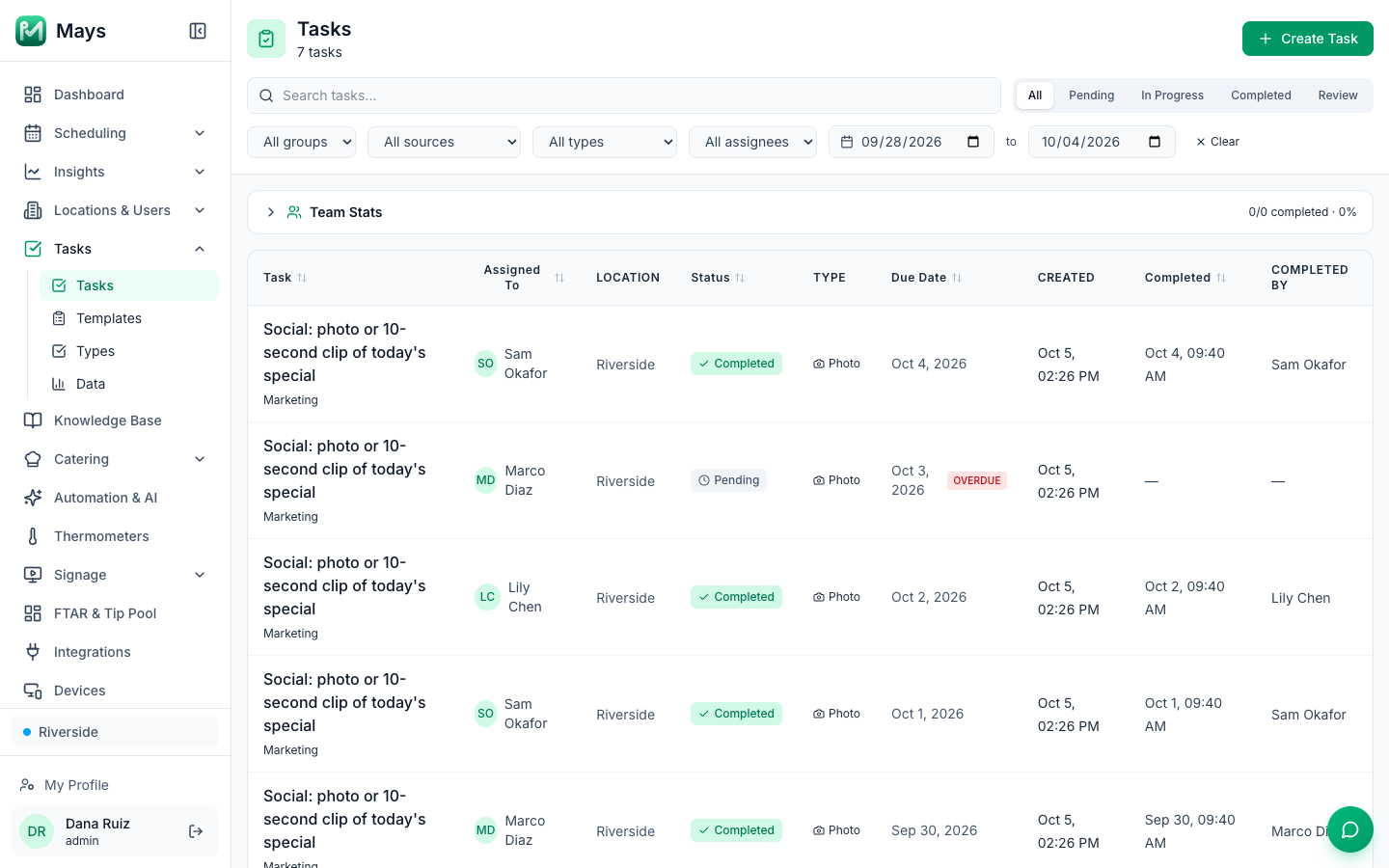
- A daily content task. In Tasks → Templates, create a template with one task, "Photo or 10-second clip of today's special", give it a Photo answer, schedule it Daily, and assign it to the opener's role. The image at the top of this post shows a week of it in Tasks: who did it, when, and the day nobody did. The team's photos land in one place, so whoever posts doesn't have to chase them.
- Your photo rules, written once. Put the basics in a Knowledge Base article: shoot by the window, vertical for Reels, no customers' faces without asking, nothing from behind the counter that shouldn't be public.
- Reviews in the same app. Instagram comments aren't in Mays, but Google reviews are. See our Google Business Profile guide.
Your Instagram checklist
- Professional business account, public, with contact details
- Bio with your hours, up to 5 links, menu first
- Highlights for Menu, Hours and Find us
- Four or five content themes you rotate
- Two or three feed posts or Reels a week, Stories most days
- No more than 5 hashtags; location on every post
- Only cleared music on business Reels
- Creator partnerships disclosed with the paid partnership label and plain words
- No bought followers, likes or reviews
- Insights reviewed every two weeks
Get the photos shot every day
Put the daily content task on someone's list, and stop hunting through the team's camera rolls.
Start your free trial: 30 days, every module, no card needed. Planning a seasonal launch? Our guide to seasonal menu changes has the eight-week plan.