Beyond Google: Apple Maps, Yelp and Bing Places for a new café
You set up your Google Business Profile before opening, so people can find you. Then someone with an iPhone asks Siri for "coffee near me", and your café isn't there. Or it is, with the name of the laundromat that used to be in your space.
Google is the biggest map, but it isn't the only one. Apple Maps comes built into every iPhone, Yelp has its own reviews and its own rules, and Bing runs its own business listings. Each one is free to claim, and each one takes an afternoon.
This guide covers the three, in order of how much they tend to matter to a café: Apple, Yelp and Bing. It's the third post in our Marketing a new café series. Google already has its own guide: Google Business Profile for a new café. Do that one first.
Checked October 5, 2026 against each company's help pages, linked below. Apple renamed its tools this year, so older guides may use the old names.
First: one set of facts, everywhere
Before you open any of these, write down the one true version of your details:
Detail | Example |
|---|---|
Name | Harbor Lane Coffee (exactly as on your sign) |
Address | The format the post office uses |
Phone | One number, the one that rings at the café |
Hours | Every day, plus holiday hours |
Website and menu link | A page you keep current |
Category | Coffee shop or Cafe |
Then copy it into every listing. Bing says it directly: "we recommend keeping your business name, address, phone number, website, and other key details consistent and up to date across all of your online channels" (Bing: help). Google's guidelines say the same about your name: it should match what's "used consistently on your storefront, website, stationery, and as known to customers" (Google: guidelines).
Apple Maps: claim your place card through Apple Business
The name changed. Apple Business Connect, the tool for managing Apple Maps listings, was folded into Apple Business in April 2026. Apple's announcement: "Starting April 14, Apple Business will be available as a free service in the U.S. and 200+ countries", and existing Business Connect data, "including claimed locations, place card information, photos", moved over automatically (Apple Newsroom, March 24, 2026).
Verify your organization. After signing up, "you have 60 days to verify your organization with Apple. This requires two methods of verification and can take up to five business days to complete." The methods include an EIN or D-U-N-S Number, a DNS record, or a document such as a "Food, health or alcohol permit", a lease or a utility bill (Apple: sign up and verify).
Claim or add the location. If you're already on Maps, "Phone verification may be available": Apple calls, and you "enter the four-digit verification code." A new café can be listed as "Open or Opening Soon", with an opening date that "can't be more than six months away." If someone else already manages your location, you'll see "This location is already managed" and can request a transfer with "a business license or utility bill"; that review "can take up to five business days" (Apple: add a location).
Fill in the place card:
- Hours: normal hours, plus special hours for holidays. Apple asks that "hours shown on your place card need to match the hours published on your official website" (Apple: location attributes).
- Photos, logo and cover: Apple reviews the cover photo and logo before they appear (same page).
- Website: "A Facebook, Instagram, or TikTok page can also be used. It can't be a third-party website" (same page).
- Actions: with a restaurant as your main category, you can add actions such as "Menu", "Reserve", "Waitlist", "Pickup" or "Delivery". Apple approves each one, which "can take up to three business days" (Apple: actions).
- Showcases: a module on the place card "to highlight new items, deals or sales". A showcase runs up to 365 days (90 by default), with a 38-character headline and a 100-character body (Apple: showcases). Use one for your seasonal menu.
Keep it accurate. If customers find you closed when the card says open, "they can report this issue to Apple", and Apple "edits your place card" (Apple: maintain accuracy). Keep the hours right, and nobody has a reason to report them.
Yelp: claim the page, then leave reviews alone
Claiming is free. "Claiming is free, and a claimed page does not mean that the business is an advertiser with Yelp." A claimed page lets you respond to reviews "with a direct message or comment", upload photos and update your address, phone, hours and website (Yelp: what is a claimed business). Start at biz.yelp.com or the Yelp for Business app; Yelp verifies by phone (Yelp: claim a business page).
Log in now and then. Yelp says "A claimed business page may be updated to show as being unclaimed after a period of inactivity by the business owner" (claimed business page).
Don't ask for Yelp reviews. This is where Yelp differs from Google. Yelp's rule: "Don't ask anyone to review your business, be it customers, mailing list subscribers, friends, family, etc." It warns that asking "may hurt your Yelp rating because our automated software may not recommend reviews that seem to be prompted or encouraged by the business", and: "Don't offer freebies, discounts, or payment in exchange for reviews—it will turn off savvy consumers and may also be illegal" (Yelp: don't ask for reviews).
Yelp backs this up with Consumer Alerts. It places "a Compensated Activity Alert on business pages when we receive evidence that someone is purchasing reviews", generally removed "after 90 days if the offending behavior stops" (Yelp: Consumer Alerts).
So on Yelp: claim the page, keep the details right, add good photos, and reply to reviews. Don't put "Review us on Yelp" on your receipts.
Bing Places: import from Google
It's free. Bing Places "is a free Bing service that empowers businesses to claim existing listings, or add new ones" (Bing: help).
The fast route is importing from Google. "Google sync lets you quickly import your business information from your existing Google Business Profile (GBP) and keep it up to date on Bing Places", and "If your business is already verified in Google Business Profile, Bing automatically verifies the imported listing." Two warnings from the same page: "Syncing may create duplicate listings, especially if a listing already exists on Bing", and you can't edit a synced listing directly in the Bing dashboard (Bing: sync with Google). Search Bing for your café first.
Or verify by PIN. Bing sends "a unique PIN via phone, mail, email, or text"; "postcards typically take 5-6 business days to arrive within the United States", and changes publish in "7-12 days for North America". For restaurants, Bing suggests including "A link to the menu", and you can "Upload up to 100 photos" (Bing: create your listing).
The order to do it in
Week | Listing | Why |
|---|---|---|
Before opening | Google Business Profile | The biggest one; set your opening date |
Week 1 | Apple Business | Default maps on iPhone; organization verification takes days |
Week 1 | Bing Places | Ten minutes if you import from Google |
Week 2 | Yelp | Claim the page that may already exist for your address |
Monthly | All four | Hours, holidays, photos, menu link |
A monthly 15-minute listings check
- Search your café's name on Google Maps, Apple Maps, Yelp and Bing, on a phone.
- Check the hours on each, and set special hours for next month's holidays.
- Check that the phone number and menu link work.
- Add one or two new photos where you can.
- Reply to new reviews on Google and Yelp.
Where Mays fits
Mays doesn't edit Apple, Yelp or Bing listings, and its Reviews page brings in Google reviews only. Here's where it helps:
- The monthly check as a checklist. In Tasks → Templates, create a "Listings check" template with the five steps above, set it to Monthly, and assign it to a manager. Use a Photo answer for "Hours checked on Apple Maps" so the screenshot is the proof.
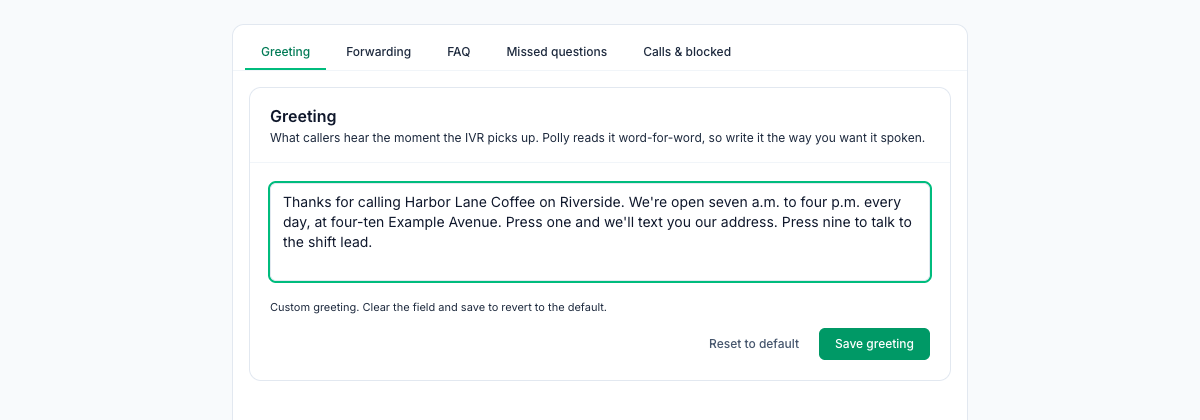
- The phone number on every listing. With the AI receptionist add-on, a location gets its own phone number, answered with a greeting you write. Put that number on your listings, or ask your phone company to forward your store's number to it. The image at the top of this post shows a greeting that gives the hours and address, written out in words because a computer voice reads it word for word. Callers can press 1 to get your address by text, or 9 to reach the number you choose, like the shift lead's phone. When your hours change, update the greeting the same day you update the listings.
- Google reviews in one place. Once Google Business Profile is connected and each location is linked, replies to Google reviews are written and sent from Reviews. See our guide to your first 50 Google reviews.
Your listings checklist
- One written set of name, address, phone, hours and links
- Google Business Profile complete
- Apple Business: organization verified, location claimed, hours, photos and actions added
- Yelp page claimed; no review requests, no incentives
- Bing Places imported from Google (after checking for duplicates) or verified by PIN
- Special hours set on every listing before each holiday
- A monthly listings check on someone's list
Put the listings check on the calendar
Four maps, one set of facts, checked once a month by the same person.
Start your free trial: 30 days, every module, no card needed. Want the AI receptionist answering the number on your listings? Book a walkthrough.