Federal law and every state limit when and how long anyone under 18 may work. Turn on work rules for minors at a location and Mays checks each shift of a 14-, 15-, 16- or 17-year-old against those limits. It works out their age on the day of the shift from their date of birth.
Not legal advice. Mays helps you comply: every rule it checks links the official law it comes from, and the card lists what it doesn't check yet. Nothing is ever blocked. You can still schedule anyone, and you get a warning.
Turn it on for a location
Work rules for minors are part of Labor law compliance, which is off until an admin turns it on for your organization in Settings → Organization (see Labor & compliance). Even then, minors' rules stay off until an admin turns them on, location by location. While they're off, nothing on the schedule changes.
- Go to Locations & Users → Locations, open the location and pick the Scheduling tab.
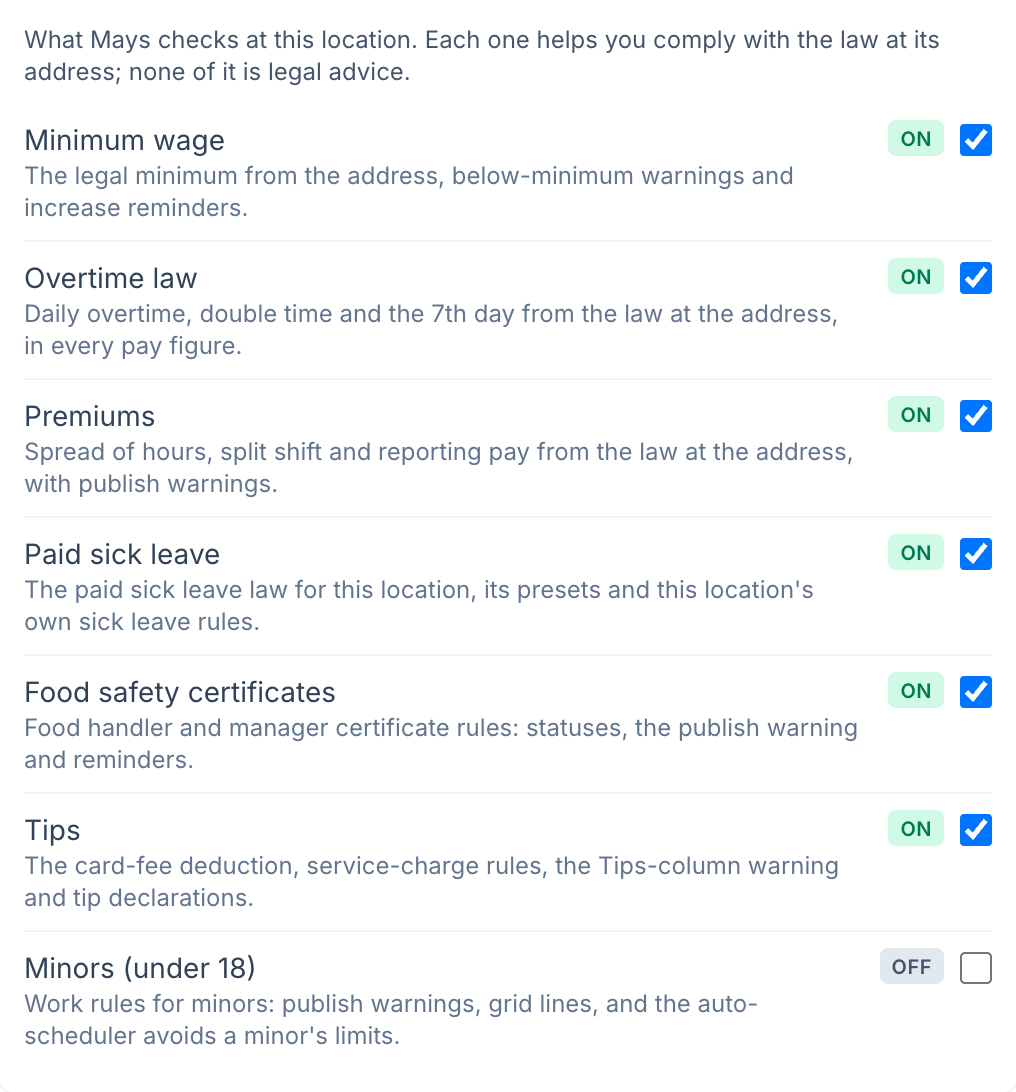
- On the Labor & compliance card, in the Labor law compliance group, turn on Minors (under 18). It saves right away.
- In the Minors (under 18) group that appears below, pick the School calendar (see School days below), then click Save.
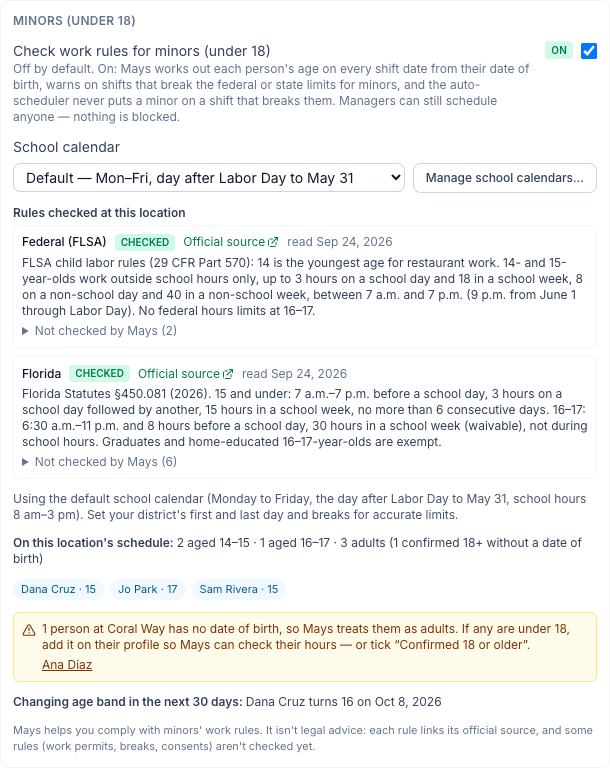
Once it's on, the card shows:
- Rules checked at this location. These are the federal rules (the Fair Labor Standards Act), plus your state's own rules where Mays has them, each with an Official source link and the day Mays last read it. Not checked by Mays lists the parts of each law Mays doesn't check.
- Who's affected: how many people on this location's schedule are 14–15 and 16–17, and who is a minor.
- People with no date of birth, with a link to each profile (see Dates of birth below).
- Changing age band in the next 30 days, for example Dana Cruz turns 16 on Oct 8, 2026.
A location outside the US doesn't get these rules. Mays goes by the location's Timezone, and the card says Minors' work rules are available for US locations.
Which laws. Mays always checks the federal rules. It also checks the state's own limits in California, Florida, New York and Texas, each read from the state's law. In other states the card marks the state as Not checked yet, so check your state labor department for its limits. Each law is checked on its own. When two laws limit the same thing, the stricter one is the one you see. For example, a 15-year-old in Texas is held to the federal 3 hours on a school day, not Texas's 8.
What gets checked
Age is worked out for each shift, on the location's calendar day the shift starts:
Age | What Mays checks |
|---|---|
Under 14 | Every shift gets a warning. Federal law doesn't allow restaurant work under 14. |
14–15 | Federal: work outside school hours only. Up to 3 hours on a school day and 18 in a week with school, 8 hours on a day off school and 40 in a week with no school. Work only between 7 a.m. and 7 p.m., or 9 p.m. from June 1 through Labor Day. State limits where Mays has them, such as Florida's 15-hour school week or New York's 6 days a week. |
16–17 | No federal hours limit. State limits where Mays has them, for example California's 4 hours on a school day and 48 a week, Florida's 11 p.m. curfew before a school day, and New York's 10 p.m. curfew before a school day and 28 hours in a school week. |
All minors | The position's minimum age and the tasks it involves (see Positions below). |
Hours are counted across all your locations, because the limits apply per employer. An unpaid break doesn't count as hours worked, and a shift past midnight counts toward both days.
A birthday during the week. Each shift is judged at the person's age that day. Each weekly limit counts only the hours worked while the person was that age or younger. For example, someone who turns 16 on Thursday is held to the 14–15 limits Monday to Wednesday, and their Friday hours don't count toward the 18-hour week.
School days
Several limits depend on whether it's a school day, or a week with at least one school day. Mays reads that from the location's school calendar.
- Default calendar: Monday to Friday, from the day after Labor Day through May 31, with school hours 8 a.m.–3 p.m. When unsure, it treats a day as a school day, which is the stricter reading.
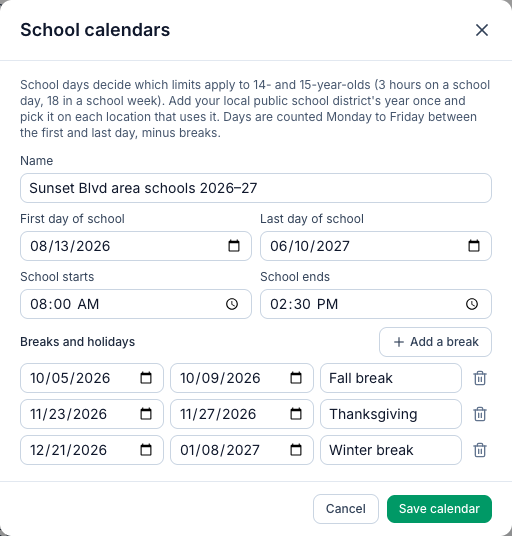
- Your own calendars: click Manage school calendars… to add your local public school district's year once: First day of school, Last day of school, School starts and School ends, and Breaks and holidays. Then pick it on each location that uses it. Outside a calendar's year Mays treats the summer around it as no school and uses the default further out. When the calendar's year ends, the card asks you for the next one.
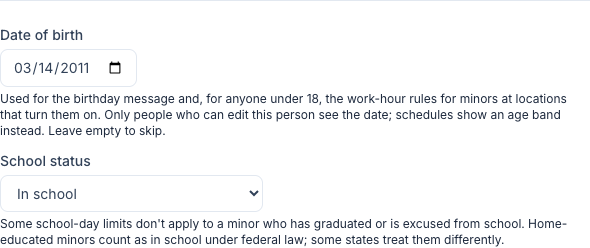
School status. On a minor's profile, School status can be In school (the default), Graduated from high school, Excused from school attendance or Home-educated. A graduate or someone excused isn't held to the school-day limits where the law says so. For example, under federal law their weeks count as having no school. Home-educated minors count as in school under federal law, and some states, such as Florida for 16–17, exempt them.
On the schedule
On the Scheduling → Schedule page of a location with minors' rules on:
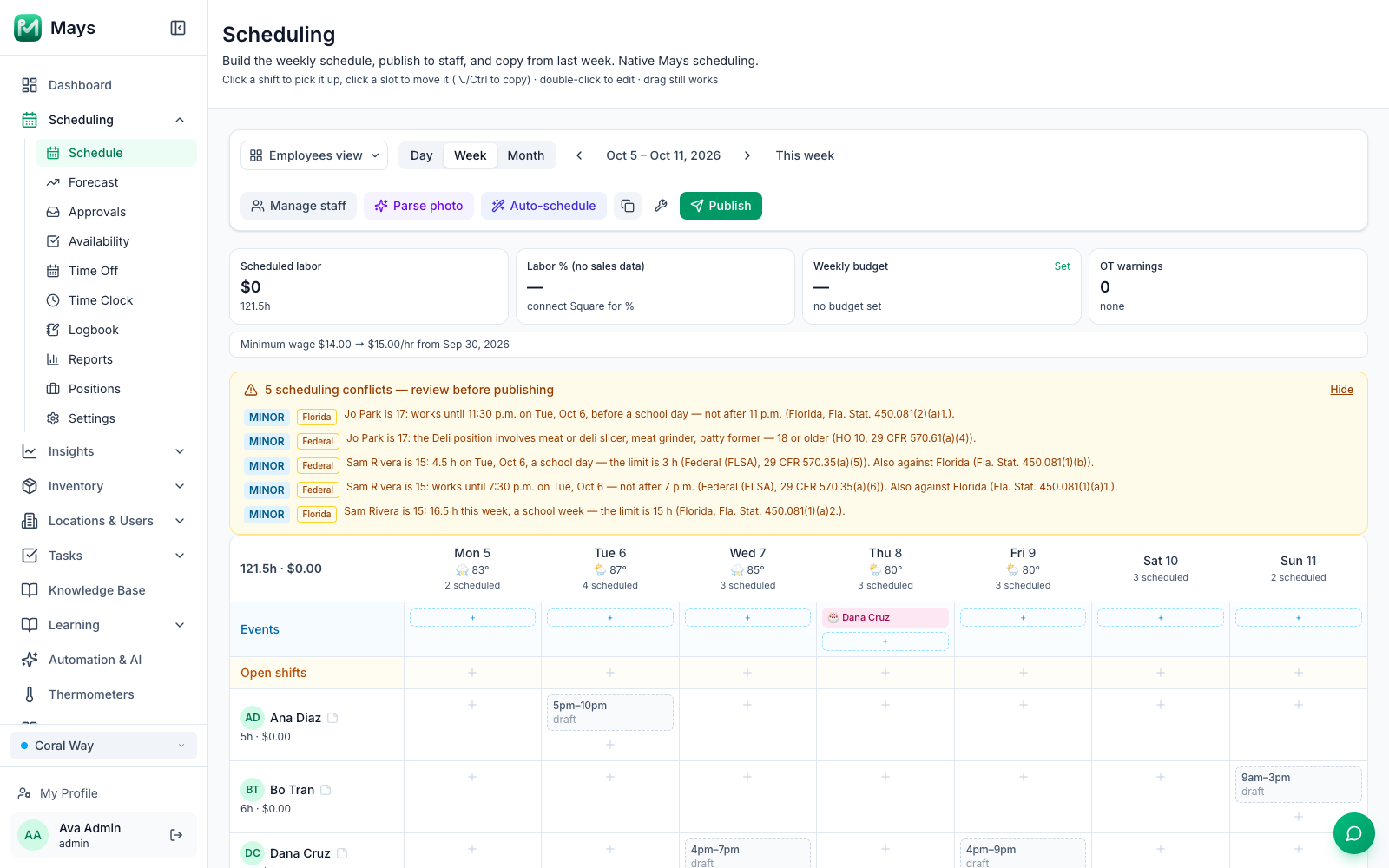
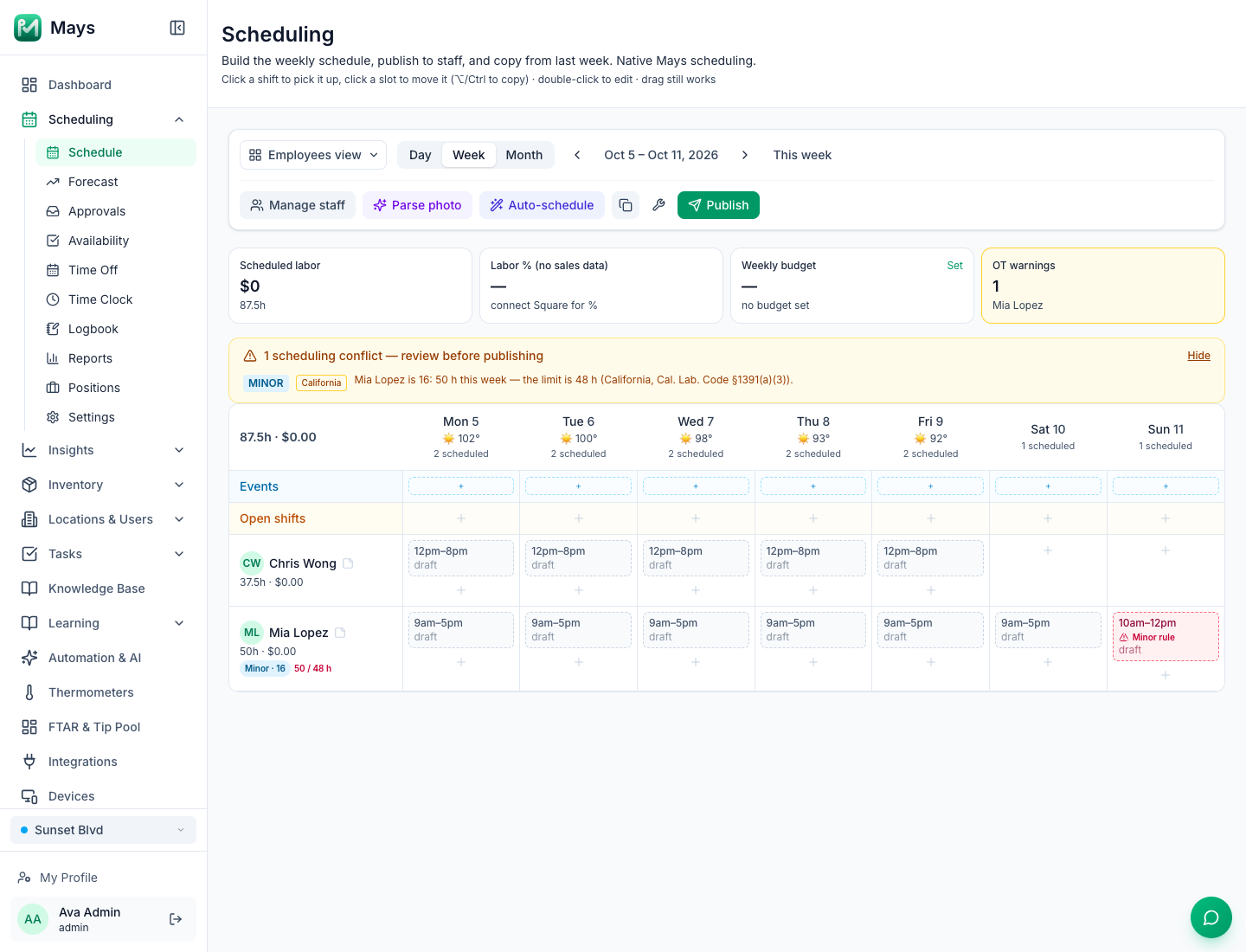
- The shift. A shift that breaks a limit is outlined in red with Minor rule. Hover over it for the reason.
- The person's row. Under the name of anyone under 18 you see their age band and the week's hours against their weekly limit, for example Minor · 15 · 16.5 / 15 h. It also shows turns 16 Thu when a birthday falls that week. The schedule never shows a date of birth.
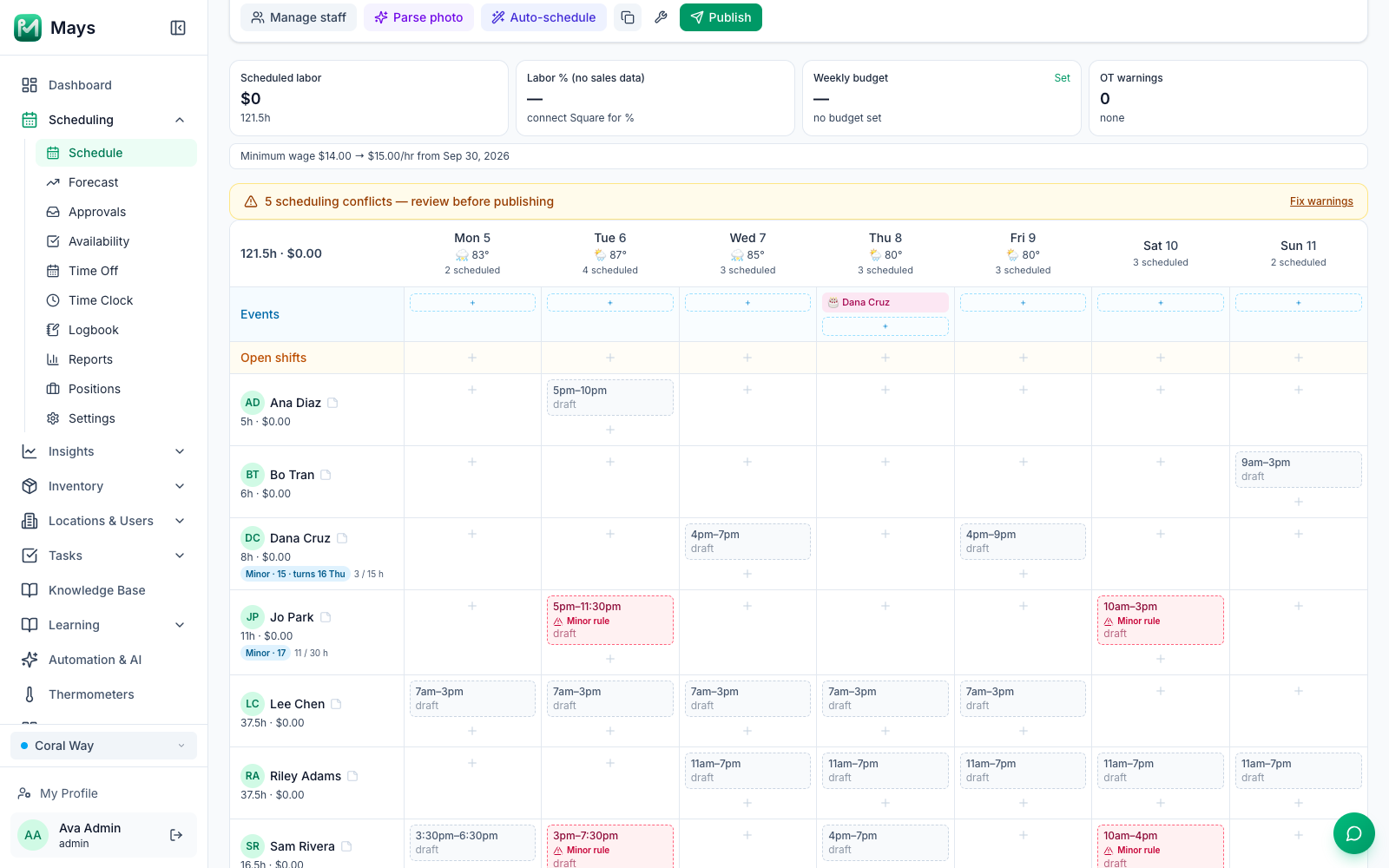
- The warnings banner. Click Fix warnings above the grid. Each minors warning is tagged MINOR, with a second tag naming the law (Federal, Florida …) that links to its official source. Each warning says who, what, when and the limit, for example Sam Rivera is 15: 4.5 h on Tue, Oct 6, a school day — the limit is 3 h (Federal (FLSA), 29 CFR 570.35(a)(5)). Also against Florida (Fla. Stat. 450.081(1)(b)).
Some limits can be lifted for one person with a parent's consent or a waiver, for example New York's midnight curfew or Florida's 30-hour week. Mays doesn't record these yet, so the warning names the consent or waiver that would allow it.
Warnings never stop you from publishing. Only people who can build the schedule see the minors warnings and the band on the rows.
The auto-scheduler stays inside the limits
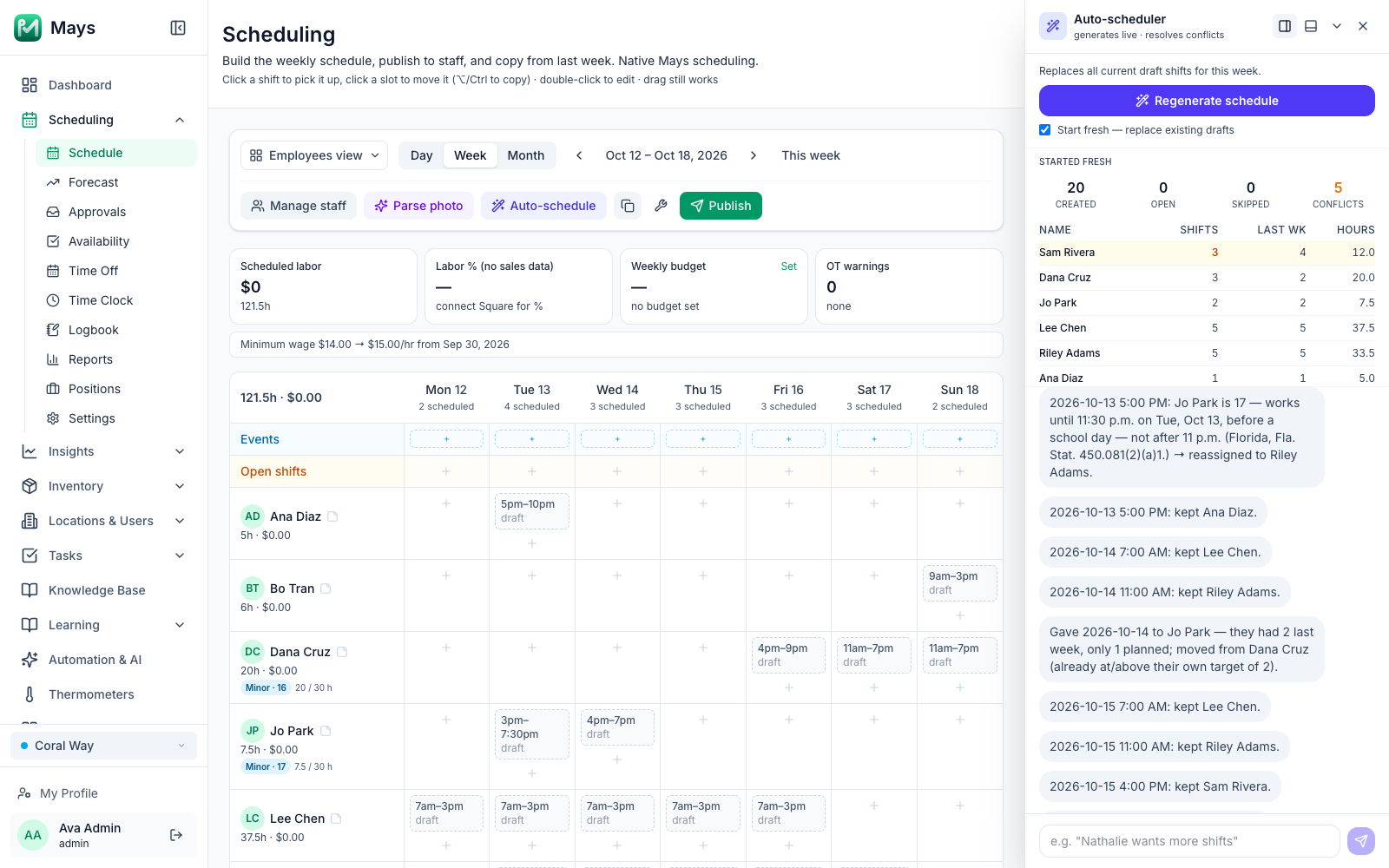
When you click Generate schedule, the auto-scheduler never puts a minor on a shift that would break one of their limits. That includes the hours, the time of day, school hours and the position's minimum age. It gives the shift to someone else or leaves it open, and tells you why, for example Jo Park is 17 — works until 11:30 p.m. on Tue, Oct 13, before a school day — not after 11 p.m. (Florida…) → reassigned to Riley Adams.
If you ask the assistant in the panel for a change that would break a minor's limits, it always asks you first, whatever Ask before changing is set to, and shows the warning. You decide.
Positions: minimum age and tasks
Some jobs aren't allowed for minors under federal law, whatever the hours. Examples are a meat or deli slicer, a dough mixer, a cardboard baler or delivery driving under 18, and baking or most cooking under 16. Mays can't see what someone does on a shift, so you tell it through the position:
- Go to Scheduling → Positions and edit the position, or create one.
- Set Minimum age: No minimum, 16 or older or 18 or older.
- Under Does anyone in this position do any of these?, tick the tasks the position involves. Ticking one suggests the age it needs. Each task links to the federal rule behind it.
- Click Save Changes.
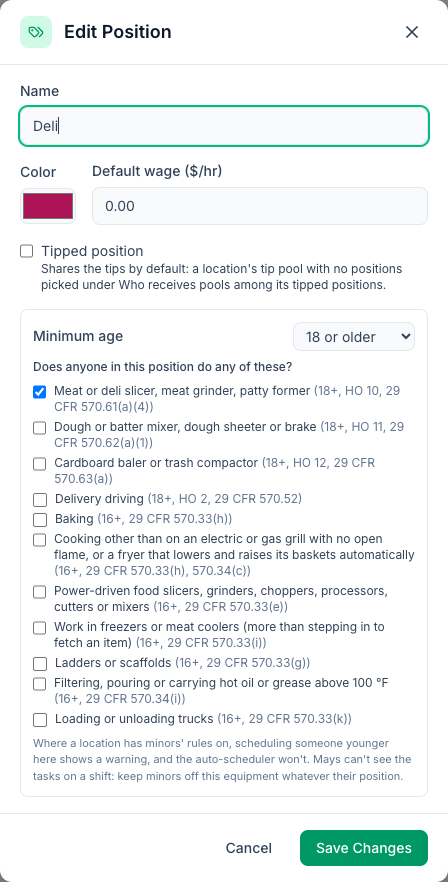
At a location with minors' rules on, someone younger than the position allows gets a Minor rule warning on that shift, and the auto-scheduler won't put them there. Keep minors off the equipment whatever their position. The position only tells Mays what the job involves.
Dates of birth
Mays works out ages from each person's Date of birth on their profile (Locations & Users → Users → the person).
- Who sees the date: only people who can edit that person, meaning admins and managers for the staff at their locations, plus the person themselves. Anyone else sees Only people who can edit this person see their date of birth. The schedule, warnings and the card show only the age band, like Minor · 15.
- Every change is logged on the person's Activity timeline. The dates in it are hidden from anyone who can't see the date of birth.
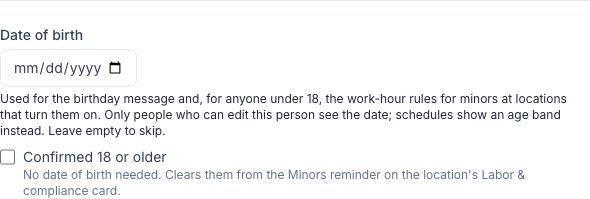
- No date of birth means Mays treats the person as an adult. The location's card lists everyone on the schedule with no date of birth, so you can add it. If someone is an adult and you'd rather not store their date of birth, tick Confirmed 18 or older on their profile. That removes them from the list.
What isn't checked yet
- Open shifts, claims, trades and finding cover. A minor can still claim an open shift, and you approve every claim.
- The time clock. Clocking in is never blocked, and there are no alerts for minors yet.
- Minors' meal breaks, and work permits or age certificates.
- Parent consents and waivers. The warning names them instead.
- States other than California, Florida, New York and Texas. For those, Mays checks the federal rules only.
See also Labor & compliance (per location).