See the week's deliveries day by day: the orders you're expecting and what actually arrived. Then check each delivery against its order.
Where: Inventory → Receiving on the web, for the location picked in the sidebar. Admins, and managers at their own locations.
Read the board
The board shows one week, Monday to Sunday. Each day lists:
- Expected: orders you've sent that are due that day, with the order number, its status (sent, partial or received), the vendor, the number of lines and the total.
- Received: invoices you posted that day, with the vendor, lines and total. linked PO means the invoice was matched to its order. ad-hoc means it wasn't, such as a delivery nobody ordered through Mays.
The bar at the top compares the week's Expected total with its Received total. Use the arrows to change weeks and This week to come back.
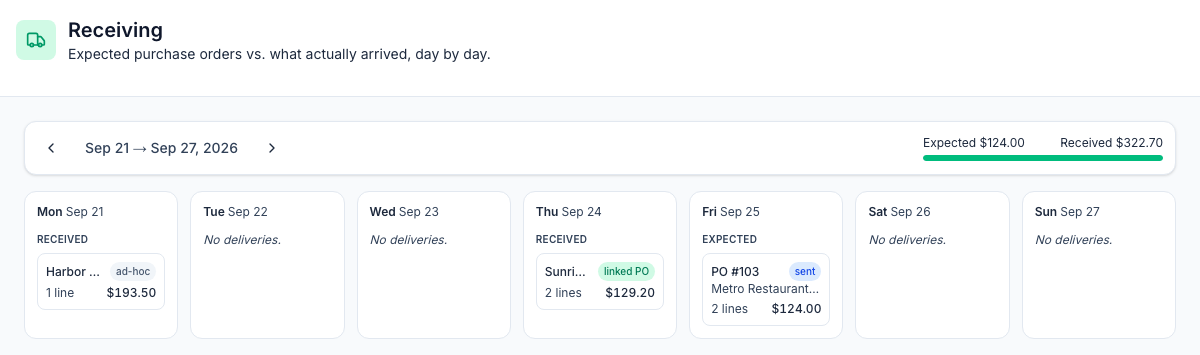
Which orders show: an order appears on the delivery day Mays worked out from the vendor's delivery days when you built it on the order form. Drafts, cancelled orders and orders without a delivery day don't appear, so set up your vendors' delivery days and build orders with New order. Orders created from Suggested orders don't get a delivery day, so they never show here. See Vendors and vendor catalogs.
Receive a delivery against its order
When a delivery arrives:
- Check what came in against the vendor's invoice.
- Add the invoice under Inventory → Invoices (a photo, the email address or by hand), check the lines and click Post & receive. This is what adds the stock. See Vendor invoices.
- Open the order under Inventory → Orders. Under Receive · 3-way match, pick the invoice in Pick posted invoice… and click Match.
- Mays shows ✓ Invoice matches the order exactly. or a table of what's different for each item. The order moves to Received, or stays Placed as partial if something is short.
On the board, the delivery now shows linked PO instead of ad-hoc. See Placing purchase orders for more on matching.
Good to know
- Only posted invoices count as received. A draft invoice isn't on the board.
- Matching doesn't add stock again. Posting the invoice already did.
- An order stays on its expected day. Once it's received, it still shows under Expected on that day, marked received, and its invoice shows under Received on the day you posted it.
- Evening deliveries: an invoice shows on the day it was posted in the location's time zone, even late in the evening.
- The board is for looking, not editing. Its cards don't open; use Orders and Invoices.
- The week always runs Monday to Sunday here, whatever week start your schedule uses.