Food truck opening and closing checklists (free template)
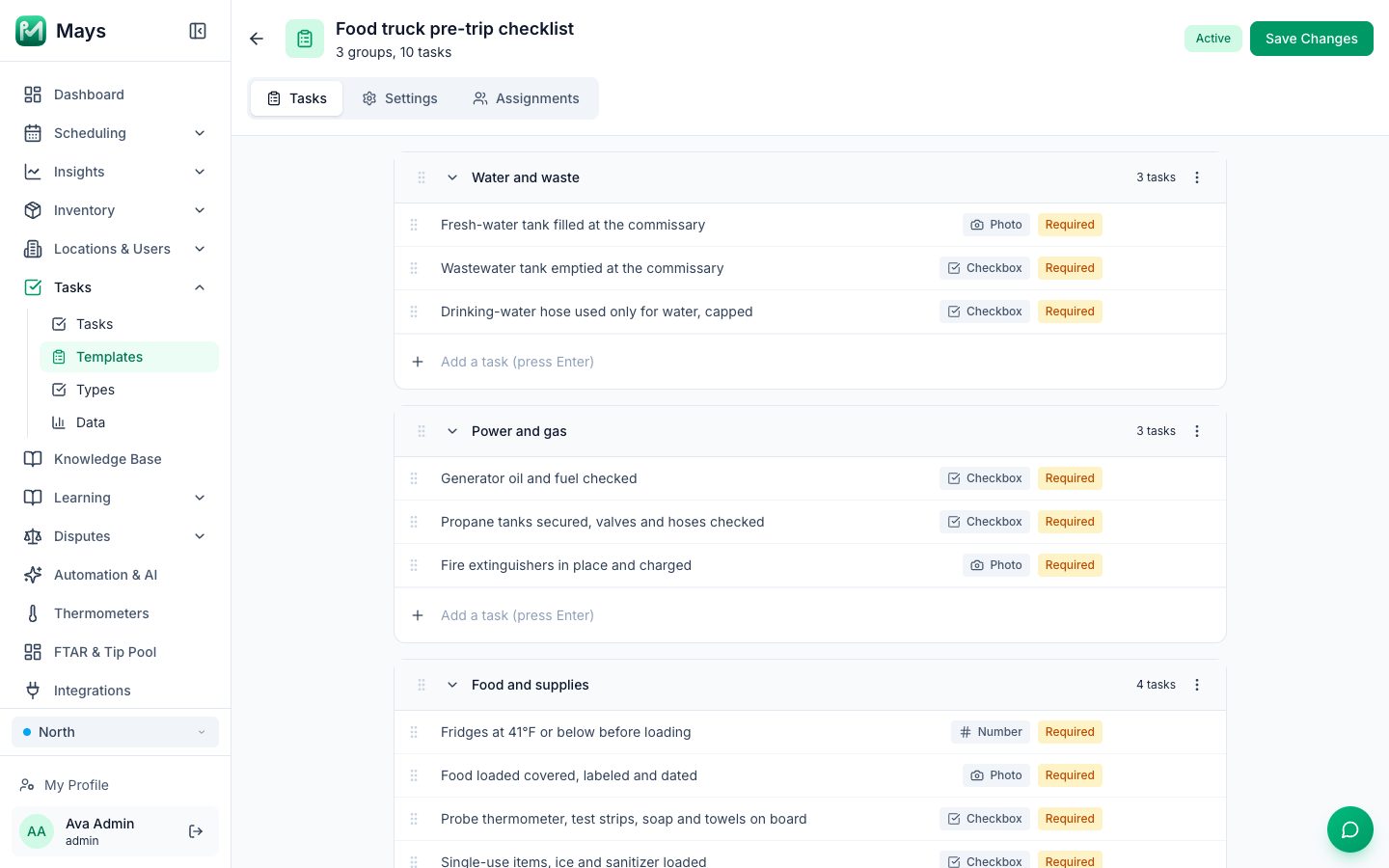
A food truck's opening checklist starts before the truck moves. Water goes in at the commissary, wastewater comes out, the propane and generator get checked, and the food rides across town in fridges running on a generator. A restaurant checklist doesn't have a line for any of that.
This template is for a truck that cooks on board, works from a commissary and parks at a different spot most days. Every task has a Who and a Proof: photo, number, checkbox, and one GPS check-in. Our checklist guide covers how to write tasks people follow.
This is general information, not legal advice. Florida's DBPR and your local fire authority have the final word. Updated September 24, 2026: the DBPR pages, rules and statute quoted here were re-checked.
Florida's mobile food rules in brief
- One state license. DBPR licenses mobile food dispensing vehicles (MFDVs): vehicles with a hand sink, a three-compartment sink, refrigeration, power, plumbing and a solid sliding service window, where food is stored, prepared and dishes are washed on board (DBPR mobile food licenses). Since 2020, licenses, registrations, permits and fees for these vehicles are preempted to the state: a city or county can't require its own license or fee, or ban food trucks from its entire area, though it can still regulate other things (s. 509.102, F.S.).
- A commissary, reported daily. An MFDV operates from an approved commissary, reports to it at least daily when operating, and notifies DBPR of each commissary on form HR-7022 before using it (Rule 61C-4.0161, F.A.C.). A self-sufficient vehicle (everything on board, including a potable water tank and a liquid-waste system) is exempt from those two rules (Rule 61C-4.0161(2)(h); the definition is in Rule 61C-1.001), but it still fills and empties at a commercial, non-residential location such as a commissary or a truck stop (DBPR MFDV guide).
- Nothing at home. A truck can't take water from or dump wastewater at a private residence, or prepare or store food, equipment or utensils there (Rule 61C-4.0161(2)(g)).
- Window and trash. The service window stays closed except when food is actually being served, and there's a waste container for customers (Rule 61C-4.0161(2)(a), (b)).
- Propane and extinguishers are installed, maintained and used under the Florida Fire Prevention Code, as approved by your local fire authority (Rule 61C-4.0161(8)).
What the Food Code adds for a truck
DBPR enforces the 2017 FDA Food Code, including its chapter on water and waste:
- A dedicated drinking-water hose. The water tank, pump and hoses for drinking water are used for nothing else (§5-304.14(A)), and the system is flushed and sanitized before use after construction, repair, modification or a period of nonuse (§5-304.11).
- Wastewater is removed at an approved waste servicing area (or by a sewage transport vehicle), and the tank is flushed and drained during servicing (§5-402.14, §5-402.15). The wastewater tank must be 15% larger than the water tank (§5-401.11(A)): check it when you buy or build.
- Hot water at the hand sink: at least 100°F (§5-202.12(A)). DBPR's high priority categories include "Water source safe, hot (100 degrees F) and cold under pressure" and "Sewage and waste water disposed properly" (DBPR inspections page).
- The same temperatures as a restaurant, on the road: cold food at 41°F or below, hot food at 135°F or above (§3-501.16(A)).
The template
Pre-trip checklist (at the commissary)
Group | Task | Who | Proof |
|---|---|---|---|
Water and waste | Fresh-water tank filled at the commissary | Lead | Photo |
Water and waste | Wastewater tank emptied at the commissary | Lead | Checkbox |
Water and waste | Drinking-water hose used only for water, capped | Lead | Checkbox |
Power and gas | Generator oil and fuel checked | Lead | Checkbox |
Power and gas | Propane tanks secured, valves and hoses checked | Lead | Checkbox |
Power and gas | Fire extinguishers in place and charged | Lead | Photo |
Food and supplies | Fridges at 41°F or below before loading | Cook | Number |
Food and supplies | Food loaded covered, labeled and dated | Cook | Photo |
Food and supplies | Probe thermometer, test strips, soap and towels on board | Cook | Checkbox |
Food and supplies | Single-use items, ice and sanitizer loaded | Cook | Checkbox |
Opening checklist (on site)
Task | Who | Proof |
|---|---|---|
Truck parked level, wheels chocked | Lead | Checkbox |
Generator running; fridges back at 41°F or below | Cook | Number |
Handwash sink: hot water, soap, towels and sign | Cook | Checkbox |
Sanitizer made and tested | Cook | Number |
Hot-held food at 135°F or above before first sale | Cook | Number |
Customer trash can out | Lead | Checkbox |
Mobile food license displayed | Lead | Checkbox |
Service checks (mid-service)
Task | Who | Proof |
|---|---|---|
Fridges at 41°F or below | Cook | Number |
Hot-held food at 135°F or above | Cook | Number |
Service window closed between orders | Lead | Checkbox |
Fresh water left; wastewater tank not near full | Lead | Checkbox |
Sanitizer bucket changed and tested | Cook | Number |
Closing checklist (on site, then at the commissary)
Group | Task | Who | Proof |
|---|---|---|---|
On site | Leftover hot food thrown out or cooled as planned | Cook | Checkbox |
On site | Flat top, grill and fryer cleaned; grease stored for disposal | Cook | Checkbox |
On site | Area around the truck picked up | Lead | Photo |
On site | Propane valves closed, generator off before driving | Lead | Checkbox |
At the commissary | Checked in at the commissary | Lead | GPS |
At the commissary | Wastewater tank emptied at the commissary | Lead | Checkbox |
At the commissary | Utensils and equipment washed and sanitized | Cook | Checkbox |
At the commissary | Food stored at 41°F or below overnight | Cook | Number |
At the commissary | Grease and trash disposed of at the commissary | Lead | Checkbox |
The GPS check-in records where the phone was when the task was done: a simple record of the daily commissary visit.
Weekly checks (Monday, carried through the week)
Task | Who | Proof |
|---|---|---|
Generator serviced per manufacturer | Owner | Checkbox |
Propane hoses and regulator inspected | Owner | Checkbox |
Hood filters degreased | Cook | Photo |
Water system flushed and sanitized after downtime or repairs | Owner | Checkbox |
Tires, hitch and lights checked | Owner | Checkbox |
Commissary agreement and license dates checked | Owner | Checkbox |
Temperature checks at a glance
What | Limit | 2017 Food Code |
|---|---|---|
Fridges and cold wells, before loading, after the drive and in service | 41°F or below | §3-501.16(A)(2) |
Hot-held food | 135°F or above | §3-501.16(A)(1) |
Reheating food for hot holding | 165°F for 15 seconds, within 2 hours | §3-403.11(A), (D) |
Cooling leftovers at the commissary | 135°F to 70°F within 2 hours, then 41°F within 6 hours in total | §3-501.14(A) |
Hand sink water | At least 100°F | §5-202.12(A) |
Adapt it to your truck
- Self-sufficient truck? Keep the water and wastewater lines, but point them at your commercial water and dump location instead of a commissary.
- Events and festivals? Add a group for the organizer's own requirements to that day's list.
- Two people on board? Split the lists by role: the lead drives and runs water, power and gas; the cook owns food and temperatures.
- Your generator's and fryer's manuals win on service intervals.
Load it into Mays
Each list is one template. In the block below, a # line is a template name, a [bracketed] line is a group, and every other line is one task.
- Go to Tasks → Templates, click Create Template, type the name and click Continue.
- Click Add Task Group, click New Group and type the group name.
- Paste one task line into Add a task (press Enter) and press Enter, then the next. One line per Enter: several lines pasted at once end up as one task.
- Click Checkbox next to a task to change it to Photo, Number or GPS, as in the Proof column.
- On Settings, choose the Frequency (Weekly with your operating days ticked, so the lists don't appear on days off; for the weekly checks, one day plus Carry unfinished duties through the week) and a Visibility Window if you like.
- On Assignments, click the truck's location, choose A role or department or Specific people, and click Create Template.
The image at the top of this post is the pre-trip checklist, built from this block.
# Food truck pre-trip checklist
[Water and waste]
Fresh-water tank filled at the commissary
Wastewater tank emptied at the commissary
Drinking-water hose used only for water, capped
[Power and gas]
Generator oil and fuel checked
Propane tanks secured, valves and hoses checked
Fire extinguishers in place and charged
[Food and supplies]
Fridges at 41°F or below before loading
Food loaded covered, labeled and dated
Probe thermometer, test strips, soap and towels on board
Single-use items, ice and sanitizer loaded

# Food truck opening checklist
[On site]
Truck parked level, wheels chocked
Generator running; fridges back at 41°F or below
Handwash sink: hot water, soap, towels and sign
Sanitizer made and tested
Hot-held food at 135°F or above before first sale
Customer trash can out
Mobile food license displayed

# Food truck service checks
[Checks]
Fridges at 41°F or below
Hot-held food at 135°F or above
Service window closed between orders
Fresh water left; wastewater tank not near full
Sanitizer bucket changed and tested

# Food truck closing checklist
[On site]
Leftover hot food thrown out or cooled as planned
Flat top, grill and fryer cleaned; grease stored for disposal
Area around the truck picked up
Propane valves closed, generator off before driving
[At the commissary]
Checked in at the commissary
Wastewater tank emptied at the commissary
Utensils and equipment washed and sanitized
Food stored at 41°F or below overnight
Grease and trash disposed of at the commissary

# Food truck weekly checks
[Weekly]
Generator serviced per manufacturer
Propane hoses and regulator inspected
Hood filters degreased
Water system flushed and sanitized after downtime or repairs
Tires, hitch and lights checked
Commissary agreement and license dates checked
Or hand it to Mays AI. Admins can click Import from Document on Task Templates, paste the block into the chat or attach it as a .txt file, review the drafts under Drafts and click Approve & save. It uses AI credits.
A new template shows up the next day; Tasks → Tasks → Create Task → From Template runs one right away.
Where Mays fits
- The lists live in the Mays app on your crew's phones, so the pre-trip list gets done at the commissary, not remembered later.
- Photos from the app's camera (the water gauge, the extinguisher, the site after you leave) and number answers for every temperature build the record an inspector asks about.
- The GPS answer shows where the commissary check-in happened.
- Managers reject a task with a reason when a photo doesn't show what it should, and it goes back on the list.
Roll out with a checklist
Build the five templates, set them to your operating days, and tomorrow's pre-trip starts at the water tank.
Start your free trial: 30 days, every module, no card needed. Or book a walkthrough and we'll load your truck's checklists with you.