Short video for a new café: Reels and TikTok on a phone, no agency
A 12-second clip of milk being poured into a latte can do more for a new café than a professional photo shoot. Short vertical video is where a lot of people discover places to eat now, and you already own the equipment: the phone in your apron.
What you don't have is time. So this guide skips the film-school theory and covers what a café actually needs: the phone settings, how to frame and light a shot, a shot list for a 15-second video, editing and captions inside the apps, the music rules for business accounts, and what makes a video eligible to be recommended to strangers.
It's the second post in our Marketing a new café series, after Instagram for a new café: the first 90 days.
Every platform rule below was checked against the platform's own help pages on October 5, 2026. Features differ by phone model and app version.
Step 1: Set up the phone once
On an iPhone:
- Grid and level: "Go to the Settings app on your iPhone. Tap Camera, then turn on Grid and Level" (Apple: camera tools). The grid keeps the counter straight.
- Resolution and frame rate: depending on the model, you can record "HD, 4K, HD (PAL), and 4K (PAL)" and change the frame rate to "24, 25, 30, 60, or 120". Apple notes that "Faster frame rates and higher resolutions result in larger video files" (Apple: record a video). 4K at 30 fps is plenty for social video.
- Lock focus and exposure: "touch and hold the focus area until you see AE/AF Lock" (camera tools page). This stops the picture from pulsing brighter and darker as a hand moves through the frame.
- Stabilization: on supported models, "Action mode provides improved stabilization while recording in Video mode" (record a video page).
On a Google Pixel: you "can record in 4K at up to 60 frames per second (FPS)", and gridlines are under More settings → Grid type (Pixel: video settings, Pixel: gridlines). Other Android phones have similar settings in their camera app.
Step 2: Shoot vertical, in 9:16
Hold the phone upright. Instagram accepts Reels "with an aspect ratio between 1.91:1 and 9:16", with "a minimum frame rate of 30 FPS" and "minimum resolution of 720 pixels" (Instagram: Reels sizes). TikTok's own specs for in-feed ads recommend vertical 9:16 (TikTok: video ad specs), and vertical is what both apps show full-screen.
Keep the important part of the shot in the middle. The top and bottom of the frame get covered by the app's buttons and your caption.
Step 3: Light and sound
- Light: shoot near the window, with the light coming from the side. Turn off the overhead lights if they're a different color from the daylight.
- A steady phone: prop it on the espresso machine, a stack of cups or a cheap tripod. Handheld is fine for walking shots; static shots look better still.
- Sound: the real sounds of a café (the grinder, the steam wand, a knife through a croissant) are part of the appeal. Record close, and shoot before the rush so the room is quiet.
Step 4: A 15-second shot list
Most café videos are one of four kinds. Each needs only a few clips:
Video | Clips (2–4 seconds each) |
|---|---|
The pour | Grinder, shot pulling, milk steaming, the pour, the finished cup in a customer's hand |
From the oven | Tray in, timer, tray out, the break or the cut, the pastry case |
Morning prep | Lights on, chairs down, first batch, door unlocked |
What's new | The ingredients, the build, the finished drink, the price board |
Shoot each clip a few seconds longer than you need. You'll trim it in the edit.
Step 5: Edit in the app
You don't need editing software.
- Instagram: when you record a reel, "you'll see a tool menu on the left" with music, effects, speed, layout, length and dual camera, and you can "align clips to see the end of your last clip" (Instagram: create a reel). Instagram's separate Edits app adds "text, music, effects, and more" (Instagram: Edits).
- TikTok: "Videos you record in TikTok can be up to 10 minutes long" and uploads "can be up to 60 minutes long" (TikTok: camera tools). For a café, under 30 seconds is the goal.
- Captions: many people watch with the sound off. Instagram's automatic captions write "the speech in the reel ... as text at the bottom" (Instagram: captions). On TikTok, "Captions will be automatically generated for videos that you upload" (TikTok: accessibility). Check them before posting: speech recognition gets drink names wrong.
- Text on screen: one line, early. "Maple oat latte, back today."
Step 6: Music rules for business accounts
This is the rule cafés break most often, usually without knowing.
- TikTok: "Verified Business Accounts don't have access to our general music library as these songs aren't cleared for commercial use" (TikTok: account types). With a business account, "when you start a new video and click on Add Sound, you will only see sounds from the Commercial Music Library" (TikTok: Commercial Music Library).
- Instagram: "certain business accounts and certain types of posts do not have access to the library" of licensed music. Meta's Sound Collection has sounds that "can be used for commercial purposes like ads" (Meta: music for businesses). Instagram also warns that licensed audio in posts "can become muted" when agreements change (Instagram: muted audio).
The simplest rule: use the café's own sound, or music from the commercial libraries.
Step 7: What gets a video recommended
Followers see your videos. Strangers only see them if the app recommends them. Instagram says content that "may not be eligible for recommendations" includes "Unoriginal content that is largely repurposed from another source with only minor, immaterial edits" (Instagram: recommendations guidelines). In its creator tips, Instagram has said it's "less likely to recommend reposts of a reel that's already on Instagram, content with noticeable watermarks", and that recommended reels "must be 3 minutes or less" (Instagram for Creators, 2023).
So:
- Shoot your own footage.
- Post to TikTok and Instagram separately, from the original file, not a download with the other app's watermark.
- On a professional account, check Account Status to see "if your content may be eligible to be recommended" (Instagram: Account Status).
Step 8: A weekly rhythm
One video a week is a good start: shot on Tuesday morning, edited on Wednesday, posted on Thursday. Rotate the four kinds from Step 4. After a month, look at which ones people watched to the end and shared, and make more of those.
Give one person the job. A barista who enjoys it will do better work than a manager squeezing it in.
Where Mays fits
Mays doesn't edit or post videos. Two things it does help with:
- The shoot as a task. Add "Film this week's video: one of the four shot lists" to a weekly checklist in Tasks → Templates, assigned to the person who owns it, with a Photo answer for a frame from the shoot. The shot lists themselves can live in a Knowledge Base article.
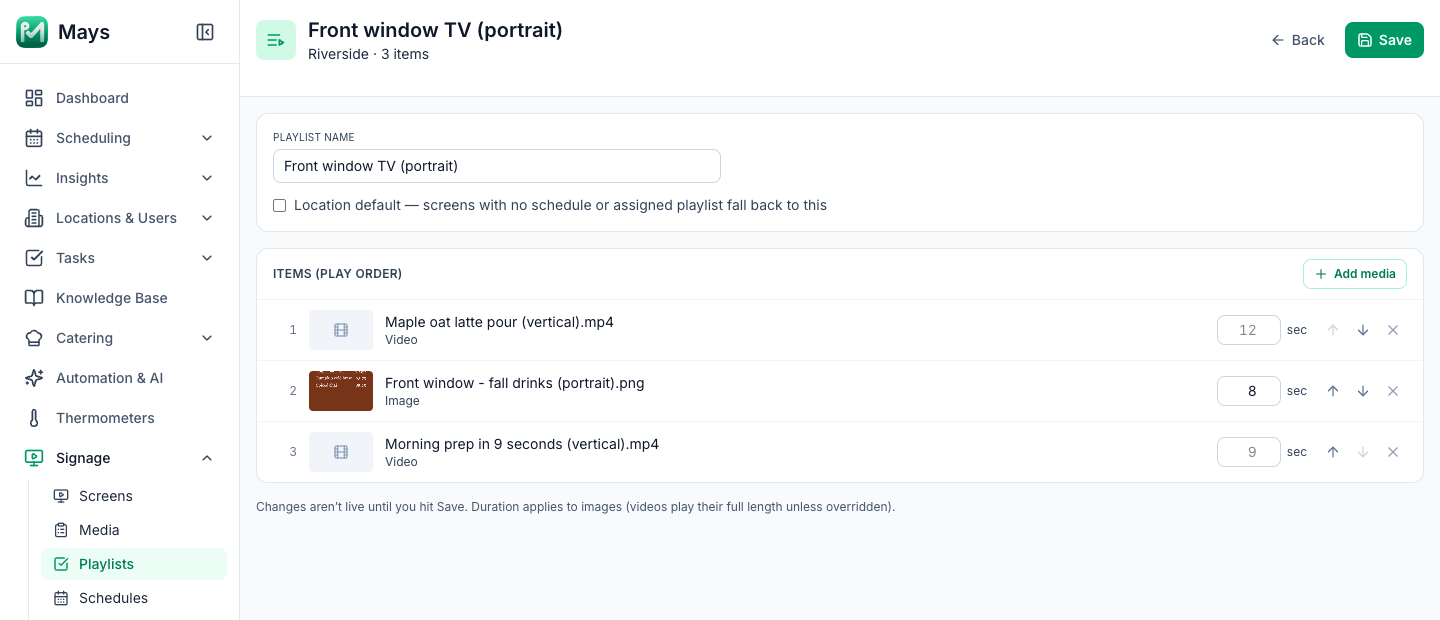
- Your videos on your own TVs. With the Digital signage add-on, you upload videos to Signage → Media and put them in a playlist with your menu boards. The image at the top of this post shows a playlist for a TV mounted on its side, with two vertical videos and a portrait board. Videos must be H.264 MP4 or MOV, up to 100 MB; HEVC (H.265) files don't play, and videos play with no sound. On an iPhone, Apple's setting Settings → Camera → Formats → Most Compatible records new videos in H.264 (Apple: HEIF and HEVC media). For a TV on its side, export at 1080 × 1920, the same shape as your Reels.
Your short-video checklist
- Grid on; 4K at 30 fps; focus and exposure locked
- Vertical 9:16, with the subject in the middle
- Window light, a steady phone, the café's real sound
- 4–5 clips of 2–4 seconds, under 30 seconds total
- Captions checked; one line of text on screen
- Business accounts: commercial music only
- Your own footage, no watermarks from other apps
- One video a week, one owner
Turn your Reels into in-store screens
Shoot it once, post it, and play it on the TV by the counter.
Start your free trial: 30 days, every module, no card needed. Want to see digital signage set up? Book a walkthrough.