Accessibility basics for a café under the ADA: entrances, counters, service animals and your website
A guest in a wheelchair who can't get through your door doesn't leave a review. They just don't come in. The same goes for a guest with a service dog who gets turned away, or a guest using a screen reader who can't read your online menu.
Accessibility is part of the guest experience, and for a café it's also the law. This post covers the basics of the Americans with Disabilities Act (ADA) for a small café, using the Department of Justice's own guidance and the 2010 ADA Standards for Accessible Design.
This is general information, not legal advice. Your state and city may have their own accessibility rules and building codes on top of the ADA. For your space, talk to a lawyer, an architect or a certified accessibility specialist. Sources checked October 5, 2026.
This is the sixth post in our series on the guest experience at a new café.
Your café is a "public accommodation"
The ADA calls businesses that serve the public "public accommodations". The DOJ's small-business primer says the ADA "establishes requirements for 12 categories of public accommodations, which include stores, restaurants, bars, service establishments" and other businesses, and that nearly all of them are covered "regardless of the size of the business or the age of their buildings" (ADA Update: A Primer for Small Business).
An older building doesn't get a pass. The primer says: "“Grandfather provisions” often found in local building codes do not exempt businesses from their obligations under the ADA."
In an existing space: remove barriers when it's "readily achievable"
Most new cafés move into an existing space. There, the ADA requires removing architectural barriers when it's "readily achievable", which the regulation defines as "easily accomplishable and able to be carried out without much difficulty or expense" (28 CFR 36.304). The primer adds that this "is based on the size and resources of a business", and that "The barrier removal obligation is a continuing one".
The primer's examples read like a café to-do list: "providing an accessible route from a parking lot to the business’s entrance, installing an entrance ramp, widening a doorway, installing accessible door hardware, repositioning shelves, or moving tables, chairs, display racks, vending machines, or other furniture."
The regulation also sets an order of priorities (28 CFR 36.304(c)):
- Access from "public sidewalks, parking, or public transportation".
- Access to the areas "where goods and services are made available to the public", for example "rearranging tables".
- Access to "restroom facilities".
- Any other measures necessary.
When removing a barrier isn't readily achievable, you still have to offer your goods and services another way "if those methods are readily achievable", such as "curb service or home delivery" (28 CFR 36.305). The primer's restaurant example: a restaurant that can't afford a ramp "must provide its services in another way if that is readily achievable, such as providing takeout service", and should "train staff on these alternatives and publicize them".
New construction and alterations are held to the 2010 ADA Standards for Accessible Design, which the primer describes as the standards that "detail the technical rules for building accessibility". If you're building out or renovating, make sure your architect designs to them.
The entrance, the route and parking
Some numbers from the 2010 Standards that matter at a café's front door:
What | The 2010 Standards say |
|---|---|
Public entrances | "at least 60 percent of all public entrances shall comply with 404" (206.4.1) |
Door width | "Door openings shall provide a clear width of 32 inches (815 mm) minimum" (404.2.3) |
Interior door force | "Interior hinged doors and gates: 5 pounds (22.2 N) maximum" (404.2.9) |
Ramps | "Ramp runs shall have a running slope not steeper than 1:12" (405.2) |
Walking surfaces | "the clear width of walking surfaces shall be 36 inches (915 mm) minimum" (403.5.1) |
Parking, 1 to 25 spaces | 1 accessible space (Table 208.2) |
The primer adds practical points:
- If only one entrance is accessible, post a sign at the others pointing to it, and that entrance "must be open whenever other public entrances are open."
- Keep the route clear. It "must be at least three feet wide" and not blocked by "furniture", "display racks, or potted plants". A sandwich board on the ramp counts.
- Small lots: a business with "four or fewer spaces" must have one accessible parking space, but "no signage is required."
The counter and the tables
Counters. Where you have sales or service counters, "at least one of each type of sales counter and service counter shall comply with 904.4" (227.3). That means a section of counter at most 36 inches high: "36 inches (915 mm) long minimum and 36 inches (915 mm) high maximum" for a side approach (904.4.1), or "30 inches (760 mm) long minimum and 36 inches (915 mm) high maximum" with knee space for a front approach (904.4.2). Keep that low section clear of tip jars and displays. If a lower counter isn't readily achievable, the primer suggests "a folding shelf or a nearby accessible counter", and in the meantime "a clip board or lap board".
Tables. Where you have dining surfaces, "at least 5 percent of the seating spaces and standing spaces at the dining surfaces" must comply (226.1), at a height of "28 inches (710 mm) minimum and 34 inches (865 mm) maximum above the finish floor" (902.3). They must be "dispersed throughout the space" (226.2), not all in one corner. An accessible route must reach "all dining areas, including raised or sunken dining areas, and outdoor dining areas" (206.2.5). And the primer's reminder for busy rooms: "arrange tables far enough apart so a person using a wheelchair can maneuver between the tables when patrons are sitting at them."
Self-service. Condiment stations and dispensers fall under the reach rules (904.5.1 and 308). A lid tower on top of a tall pastry case may be out of reach.
If you set laptop-free tables or other seating rules (see our post on Wi-Fi, laptops and seating), make sure the accessible tables stay available to the guests who need them.
Service animals: what staff can and can't ask
This is where staff most often get it wrong, so put it in writing and train it.
- What counts: "A service animal is a dog that is individually trained to do work or perform tasks for a person with a disability." Dogs "whose sole function is to provide comfort or emotional support do not qualify as service animals under the ADA" (ADA Requirements: Service Animals). Businesses must also "modify their policies to permit miniature horses where reasonable".
- Food businesses: "Establishments that sell or prepare food must generally allow service animals in public areas even if state or local health codes prohibit animals on the premises." Service animals may go "to and through self-service food lines" (Service animal FAQs).
- The only two questions, when it isn't obvious: "(1) is the dog a service animal required because of a disability, and (2) what work or task has the dog been trained to perform."
- What staff can't do: "Staff cannot ask about the person’s disability, require medical documentation, require a special identification card or training documentation for the dog, or ask that the dog demonstrate its ability to perform the work or task." A vest isn't required either.
- Not at the table: you aren't "required to allow an animal to sit or be fed at the table."
- When a dog can be asked to leave: only if "the dog is out of control and the handler does not take effective action to control it" or "the dog is not housebroken". Even then, offer the guest "the opportunity to obtain goods or services without the animal’s presence." "Allergies and fear of dogs are not valid reasons" to refuse service, and you can't charge fees that guests without animals don't pay.
A staff script that stays inside those lines:
"Welcome! Is that a service animal required because of a disability? And what task is it trained to do? Thanks, come on in."
If the answer is yes, that's the end of the conversation. If staff aren't sure what to do next, they get the shift lead; they don't argue at the door.
Your website and online ordering
The DOJ's guidance on web accessibility (March 18, 2022) says it covers how "businesses open to the public can make sure that their websites are accessible", and lists "Food and drink establishments" as an example. It says businesses "have flexibility in how they comply", and points to existing technical standards, including "the Web Content Accessibility Guidelines (WCAG)".
The 2024 DOJ web rule is a different thing: it's titled a "New Rule on the Accessibility of Web Content and Mobile Apps Provided by State and Local Governments" (fact sheet).
Practical steps for a café site:
- Put the menu in text, not only as a photo or a scanned PDF, so screen readers can read it.
- Add alt text to images that carry information, like a photo of the daily specials board.
- Check color contrast and that the site works with a keyboard alone.
- Ask your online-ordering provider how their ordering pages meet WCAG.
- Say how to reach you if something on the site doesn't work for someone.
Tax help for access work
The IRS offers two incentives. The Disabled Access Credit is for eligible small businesses that "earned $1 million or less or had no more than 30 full time employees in the previous year", and the Architectural Barrier Removal Tax Deduction lets businesses of any size "claim a deduction of up to $15,000 a year for qualified expenses" (IRS: tax benefits for businesses). The credit is claimed on Form 8826. Ask your tax adviser how they apply to your project.
Where Mays fits
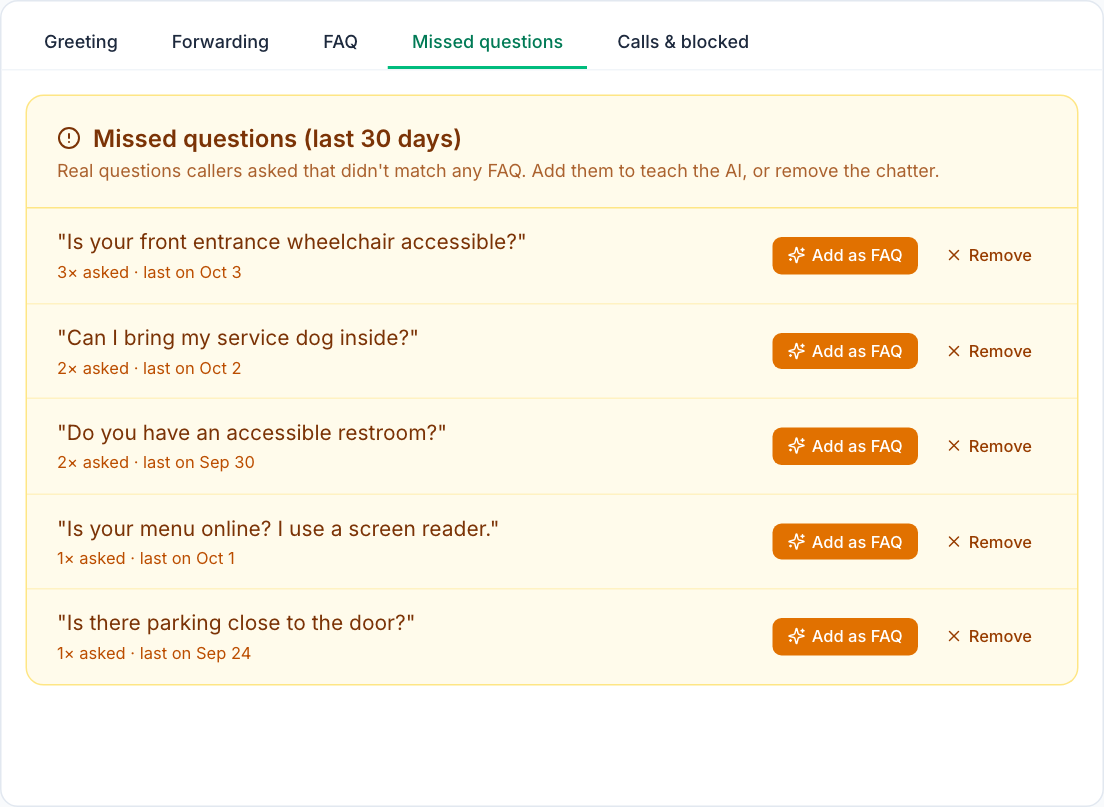
- Hear what guests ask: if you use the AI receptionist add-on, its Missed questions tab lists callers' questions from the last 30 days that no FAQ answered, grouped and counted (the image at the top of this post). Add as FAQ turns one into an answer: where the step-free entrance is, whether service dogs are welcome, where the accessible restroom is. The receptionist matches the words in your FAQ, so include the words callers use.
- The service-animal script, written down: put the two questions and the script above in a Knowledge Base article, and add a question on it to your service quiz in Learning.
- A clear route, every day: add "ramp, entrance and accessible tables clear" to your opening checklist with a Photo answer.
Mays doesn't assess whether your space complies with the ADA. That's a job for an architect or accessibility specialist.
Your accessibility checklist
- A walk-through of your entrance, route, counter, tables and restroom against the priorities above
- A plan to remove barriers that are readily achievable, and alternatives for the rest
- An accessible counter section kept clear, and accessible tables spread through the room
- Staff trained on the two service-animal questions, and on what not to ask
- A text menu, alt text and a keyboard check on your website
- A word with your tax adviser about the credit and the deduction
Make access part of every shift with Mays
Answer accessibility questions on the phone, keep the scripts where staff can find them, and check the route at open.
Start your free trial: 30 days, no card needed. Next in this series: music, sound and atmosphere, including what music licenses a café may need.